
65W vs 100W vs 140W USB-C Charger: Which Do You Actually Need?

The honest answer: most people only need 65W. Pick the tier by what you charge — not by the biggest number. 65W covers phones, tablets, ultrabooks, and the MacBook Air. 100W is for 14"/15" laptops like the MacBook Pro 14". 140W matters only for a MacBook Pro 16" or a high-watt gaming laptop — and it requires USB-C PD 3.1 EPR plus a 240W/5A cable to actually deliver it.
Quick Answer: Which Wattage by Device
65W — most people
- • Phones & tablets
- • MacBook Air (M1–M3)
- • Ultrabooks (XPS 13, X1 Carbon)
- • Most 13" laptops
- • iPad Pro / Android tablets
100W — bigger laptops
- • MacBook Pro 14"
- • 14"/15" laptops
- • Dell XPS 15
- • Lighter gaming laptops
- • Charging 2 devices at once
140W — only if needed
- • MacBook Pro 16"
- • High-watt gaming laptops
- • Fastest possible charge
- • Requires PD 3.1 EPR
- • Needs a 240W/5A cable
Rule of thumb: buy for the most demanding device you own. A higher-wattage charger safely charges everything below it, but you pay for headroom you may never use.
65W vs 100W vs 140W: Side-by-Side
| Feature | 65W | 100W | 140W |
|---|---|---|---|
| Best for | Phones, tablets, MacBook Air, 13" laptops | 14"/15" laptops, MacBook Pro 14" | MacBook Pro 16", high-watt gaming |
| USB-PD spec required | PD 3.0 (SPR) | PD 3.0 (SPR, 20V/5A) | PD 3.1 EPR (28V+) |
| Cable needed | Any 60W+ cable | 100W (5A) E-Marker cable | 240W (5A) EPR cable |
| MacBook Pro 16" full speed | No — slow / drains under load | Charges, but not fast-charge | Yes — full 140W fast-charge |
| Charges phones safely | Yes | Yes (PD steps down) | Yes (PD steps down) |
| Typical size (GaN) | Smallest — pocket size | Compact brick | Largest — desk-oriented |
| Typical price | $25–$35 | $45–$65 | $75–$100 |
| Who should buy | Most people | Larger-laptop owners | 16" MBP / gaming only |
As of June 2026. Wattage requirements based on manufacturer specs and USB-PD negotiation behavior.
The 140W Difference: USB-C PD 3.1 EPR Explained
This is the one spec the 65W-vs-100W debate never touches — and it's what genuinely separates a 140W charger from a 100W one. USB Power Delivery 3.0 caps out at 100W: a maximum of 20 volts at 5 amps. To go higher, the USB-IF created PD 3.1 Extended Power Range (EPR), which adds three new voltage levels — 28V, 36V, and 48V — to reach up to 240W. A 140W charger uses the 28V EPR level.
For 140W to actually flow, three things must all support EPR:
1. The charger
It must be a true PD 3.1 EPR charger rated for 140W (or higher). A "140W" charger that is only PD 3.0 cannot exist for single-port output above 100W.
2. The cable
You need a 240W-rated (5A) EPR cable with the correct E-Marker chip. A standard 100W (20V/5A) cable physically fits but caps charging at 100W — it can't carry the higher EPR voltages. This is the most common reason people "buy 140W" and only get 100W.
3. The laptop
Your device must request EPR. The MacBook Pro 16" (M-series) supports 140W EPR; a MacBook Pro 14" tops out around 96W and will never request 140W no matter what you plug in.
The key takeaway:
140W is not just "more 100W." It's a different power-delivery standard (PD 3.1 EPR) with a different cable requirement. If you buy a 140W charger but pair it with a 100W cable, you silently lose the entire benefit. Reputable 140W chargers — like the Anker 140W below — include a compliant 240W cable in the box for exactly this reason.
Higher Wattage Is Always Safe — But Not Always Worth It
A common worry: "will a 140W charger fry my phone?" It won't. Every USB-C charger negotiates power with the device through USB Power Delivery. Plug a phone into the 140W Anker and it draws its rated 18–45W — no more. Plug in a MacBook Air and it draws ~30–67W. The charger is a ceiling, never a forced output.
That means a 140W charger can safely replace every lower-wattage charger you own. The catch is the opposite direction: a 65W charger into a MacBook Pro 16" will charge slowly and may even lose battery during heavy workloads, because the laptop draws more than 65W under load. So the decision isn't about safety — it's about matching the tier to your most demanding device, then not overpaying for headroom you'll never use.
Our Pick for Each Tier
As an Amazon Associate, ChargeTechLab earns from qualifying purchases. Products below are independently selected based on our research. Prices and availability update automatically.
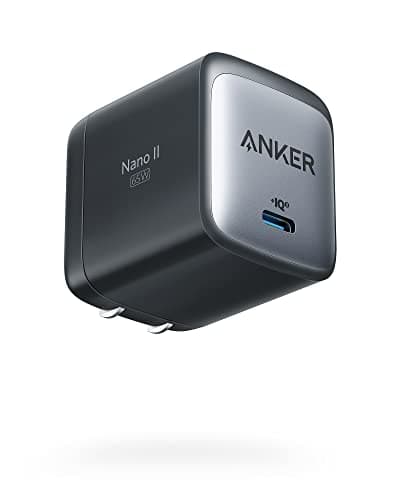
Anker Nano 65W GaN II
Best for: Phones, tablets, ultrabooks, MacBook Air, and most 13" laptops. This is the tier most people actually need.
The Anker Nano 65W is the easiest recommendation for the majority of users. A single USB-C port delivers a full 65W — enough to charge a MacBook Air at full speed, fast-charge any phone, and top up a 13" ultrabook. GaN II keeps it about the size of the original Apple 5W cube, with a foldable plug for travel. Unless you own a 15"+ laptop, this is all the charger you need.
Pros
- Full 65W from one USB-C port — full-speed for MacBook Air and most 13" laptops
- GaN II keeps it tiny and travel-friendly with a foldable plug
- PPS support fast-charges Samsung and Pixel phones at full rate
Cons
- Single port — can only charge one device at a time
- Not enough for a MacBook Pro 16" or high-watt gaming laptop
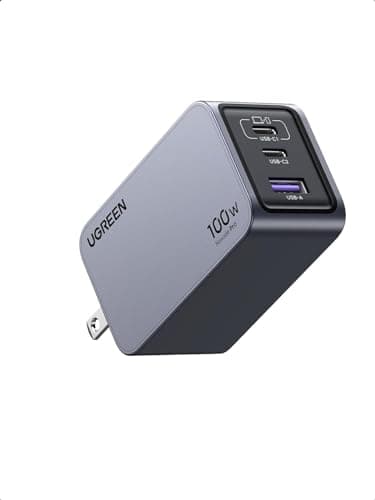
UGREEN Nexode 100W 3-Port
Best for: 14"/15" laptops, MacBook Pro 14", lighter gaming laptops, and anyone charging two devices at once.
The UGREEN Nexode 100W is the sweet-spot charger for 14" and 15" laptops. The primary USB-C port delivers a full 100W — enough to fast-charge a MacBook Pro 14" or a Dell XPS 15 over USB-C — and the three ports let you run a laptop, phone, and earbuds from a single wall plug. For most people who own a larger laptop but not a 16" MacBook Pro, 100W is the practical ceiling.
Pros
- Full 100W single-port — fast-charges MacBook Pro 14" and Dell XPS 15
- Three ports (2× USB-C, 1× USB-A) for charging multiple devices at once
- Compact GaN body for a 100W charger — travels well
Cons
- Single-port maxes at 100W — not enough for a 16" MacBook Pro at full speed
- Power is shared across ports when several devices are plugged in
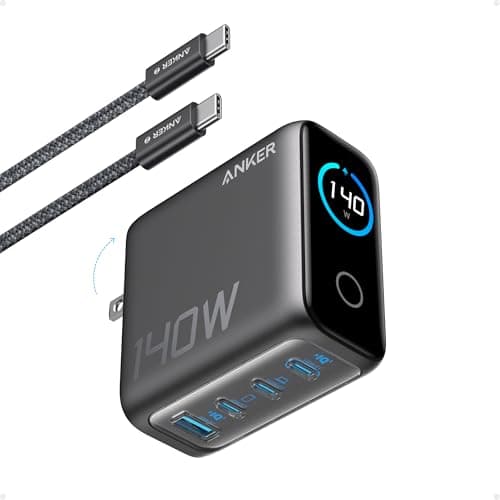
Anker 140W 4-Port GaN
Best for: MacBook Pro 16", high-watt gaming laptops, and anyone who wants the fastest possible charge over USB-C.
The Anker 140W 4-Port is the charger to buy only if you genuinely need it: a MacBook Pro 16" or a high-watt USB-C gaming laptop. Its top USB-C port delivers a true 140W using USB-C PD 3.1 Extended Power Range (EPR) — the spec that unlocks anything above 100W. To actually hit 140W you also need a 240W/5A EPR-rated cable; Anker includes one in the box. A smart display shows live wattage per port, and the same charger safely trickle-charges a phone at a few watts thanks to PD negotiation.
Pros
- True 140W via USB-C PD 3.1 EPR — charges MacBook Pro 16" at full speed
- Ships with the required 240W/5A EPR cable, so you can actually reach 140W
- Four ports plus a smart display showing real-time wattage per port
Cons
- Overkill (and pricier) unless you own a 16" MacBook Pro or high-watt gaming laptop
- Larger and heavier than a single-port 65W travel charger
The Verdict: Do You Actually Need 140W?
If you charge a phone, tablet, MacBook Air, or any 13" ultrabook, 65W charges everything at full speed for the lowest price and smallest size. This is the right call for the majority of users.
A MacBook Pro 14", Dell XPS 15, or similar 14–15" laptop charges at full speed on 100W — and a multi-port 100W charger covers a phone and earbuds too. There's no meaningful benefit to 140W here, because these laptops rarely draw above 96W.
140W (via PD 3.1 EPR and a 240W cable) only pays off when your hardware can request more than 100W. The MacBook Pro 16" is the clearest case — it unlocks Apple fast-charge and holds battery under sustained load. Some high-watt USB-C gaming laptops also benefit. Everyone else is paying for capability they can't use.
Our bottom line:
Buy 65W unless you have a specific reason not to. Step up to 100W for a 14"/15" laptop. Reserve 140W for the MacBook Pro 16" or a genuinely high-watt gaming laptop — and if you do buy 140W, make sure you use the included 240W EPR cable, or the upgrade is wasted.
65W vs 100W vs 140W USB-C Charger: FAQ
Keep Narrowing It Down
Still deciding? These guides go deeper on the two-way matchup, the best 100W chargers, and exactly how much wattage your specific laptop needs.
Affiliate Disclosure: As an Amazon Associate I earn from qualifying purchases. Prices shown are approximate and subject to change. Last verified June 2026.