
How USB-C Power Delivery Works

USB-C Power Delivery (PD) is a charging protocol that allows devices and chargers to negotiate how much power to transfer through a USB-C cable. Unlike basic USB charging that delivers a fixed 5 volts, Power Delivery supports multiple voltage levels up to 20V and current up to 5A, enabling charging speeds from 15W to 100W through a single universal connector. This is what makes it possible to charge laptops, tablets, and phones with the same cable and charger type, with each device receiving exactly the power it needs.
What is USB-C Power Delivery?
USB-C Power Delivery is a standardized fast-charging protocol defined by the USB Implementers Forum (USB-IF). It allows a charger and device to communicate electronically to agree on the optimal voltage and current before power transfer begins. This negotiation ensures safe, efficient charging at power levels ranging from 15W up to 100W (and up to 240W under the newer Extended Power Range specification). Every USB-C PD transaction is controlled by the receiving device, which means your laptop or phone determines how much power it accepts, not the charger.
How Power Negotiation Actually Works
When you connect a USB-C charger to a device, a rapid electronic conversation takes place before any significant power flows. This negotiation happens through the CC (Configuration Channel) pins in the USB-C connector and determines the exact voltage and current the charger will deliver.
The key calculation is straightforward: Watts = Volts x Amps. So 20V at 5A equals 100W, which is the maximum output under the standard USB Power Delivery specification. To reach this full 100W, both the charger and cable must support the 20V/5A power profile.
E-marker chips play a critical role in high-wattage charging. These are small electronic chips embedded inside USB-C cables that communicate the cable's current-carrying capability to the charger. Any cable rated for more than 3A (60W at 20V) is required to contain an E-marker chip. Without it, the charger automatically limits output to 60W as a safety precaution, regardless of the charger's rated capacity.
The negotiation sequence works as follows: the charger advertises its supported voltage profiles to the device, the device selects the optimal profile for its needs, and the charger then switches to the agreed voltage and current. This entire process completes in milliseconds and repeats if conditions change (for example, if battery level rises and the device requests less power).
Does 100W Always Deliver 100W?
No. A charger rated for 100W will not always deliver 100W in practice. Several factors determine the actual power your device receives during real-world charging.
Cable Current Limitations
Standard USB-C cables support a maximum of 3A, which limits power delivery to 60W even when connected to a 100W charger. Only cables with E-marker chips and 5A ratings can carry the full 100W. Using an incorrect cable is one of the most common reasons users do not achieve expected charging speeds. For more detail, see our guide on how cable quality affects charging speed.
Multi-Port Power Splitting
When a multi-port charger has multiple devices connected simultaneously, the total rated wattage is distributed across all active ports. A 100W charger with two devices connected might allocate 65W to the primary port and 30W to the secondary, or split power differently depending on the manufacturer's allocation logic. The charger's total output does not increase when more devices are connected. Learn more about how one charger handles multiple devices.
Device-Side Charging Limits
Your device's internal charging circuitry determines the maximum power it can accept. A MacBook Air draws a maximum of 30-45W regardless of charger capacity. An iPhone caps at roughly 27W. The device always controls intake, so connecting a phone to a 100W charger does not mean the phone receives 100W. Check our guide on how much wattage your laptop actually needs to match your charger to your device.
Thermal Throttling
Chargers that overheat during sustained use may reduce their power output to prevent damage. This is called thermal throttling. Some lower-quality chargers advertise 100W but cannot maintain that output continuously, dropping to 80W or less under prolonged load. This is why choosing a tested 100W charger with verified sustained output matters for laptop users.
Technical Summary for Power Users
- Maximum theoretical output: 100W under USB PD 3.0 (20V at 5A). USB PD 3.1 Extended Power Range supports up to 240W (48V at 5A) but requires compatible hardware.
- Required cable specifications: Cables must be E-marked and rated for 5A to support 100W. Standard 3A cables are limited to 60W at 20V. Wire gauge (typically 20AWG for power conductors) affects resistance and heat generation.
- Protocol negotiation: PD communication occurs over the CC pin using BMC-encoded messaging. The source advertises PDOs (Power Data Objects), and the sink selects a compatible profile via an RDO (Request Data Object).
- Multi-device behavior: Total charger output is shared across active ports. Power allocation varies by manufacturer. Most chargers prioritize the first connected device (typically the laptop port) and reduce secondary port output dynamically.
- Safety mechanisms: Overcurrent protection (OCP), overvoltage protection (OVP), short-circuit protection (SCP), and thermal shutdown are required by USB-IF certification. Non-compliant chargers may lack these protections.
Comparison Overview
Key specifications and behavior of USB-C Power Delivery at a glance.
Voltage Profiles
USB-C Power Delivery supports multiple voltage levels including 5V, 9V, 15V, and 20V, allowing devices to request the level they require.
Current
High-power charging requires up to 5 amps. Cables must support 5A to enable full 100W delivery.
Maximum Wattage
The maximum standard USB-C Power Delivery output is 100W, calculated as 20 volts multiplied by 5 amps.
Cable Requirements
Cables delivering 100W must include an E-marker chip that communicates current capability to the charger.
Multi-Port Behavior
On multi-port chargers, total output is shared dynamically across connected devices, reducing per-port wattage when multiple devices are in use.
Chargers That Implement PD Properly
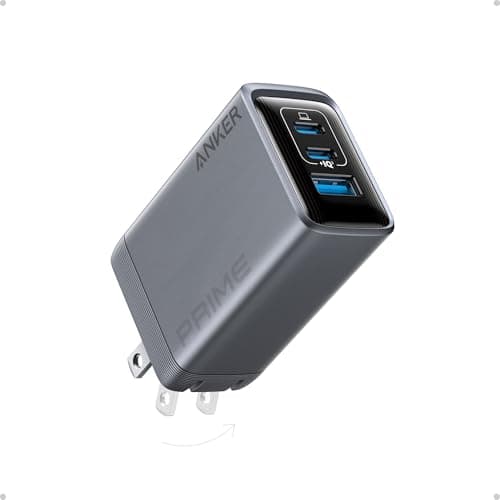
Power Delivery only works as described above when the charger advertises the full voltage ladder. These two do — one for standard PD 3.0 at 100W, one for the PD 3.1 tier above it. For the full comparison, see our 100W charger guide or our 140W guide.
Key Specifications
- 100W total
- 3 ports (2C + 1A)
- Full PD 3.0 voltage ladder
- PPS support
- GaN technology
Pros
- Offers every standard PD voltage step, so devices negotiate cleanly
- PPS support for fine-grained phone charging
- Sustains 100W without thermal throttling
- Dynamic power reallocation across ports
Cons
- Premium price point
- Shared power reduces per-port wattage
Why it's a good choice
Everything described on this page — the voltage ladder, the negotiation handshake, PPS — only works if the charger actually advertises the full range of profiles. Cheap chargers often expose two or three and force devices into a slow fallback. This one advertises the complete set and reallocates power between ports as devices come and go, which is PD 3.0 behaving the way the specification intends.
✓ Buy if you have:
Laptop owners wanting one brick for everything, anyone whose current charger falls back to 5V, multi-device desks
✗ Skip if you have:
Single-phone users — you would never draw more than a fraction of this capacity
Best for:
Seeing PD negotiation work as designed across a laptop, tablet and phone at once
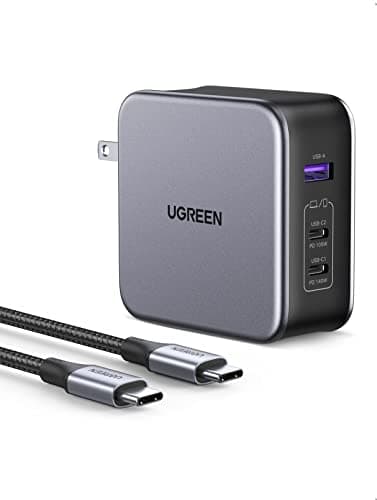
UGREEN Nexode 140W 3-Port GaN Charger
$66.49
Key Specifications
- 140W total output
- PD 3.1 Extended Power Range (28V)
- 3 ports (2C + 1A)
- PPS support
- Foldable plug
Pros
- Reaches the 28V EPR tier that PD 3.1 added above 100W
- Fast-charges 16-inch MacBook Pro at full rated speed
- Backward compatible with every older PD device
- Cheaper than most first-party 140W bricks
Cons
- Requires a 240W-rated cable to hit 140W
- Overkill for laptops that cap at 65W
Why it's a good choice
PD 3.1 is the part of the standard that broke the old 100W ceiling by adding higher voltage tiers up to 48V. A 140W charger is the practical entry point to that tier, and it is what a 16-inch MacBook Pro needs to charge at its rated speed rather than a reduced one. Note the cable requirement — EPR wattage needs an EPR-rated cable, or the negotiation simply settles lower.
✓ Buy if you have:
16-inch MacBook Pro owners, high-wattage Windows workstations, anyone future-proofing for EPR laptops
✗ Skip if you have:
Users whose laptops top out at 65W or 100W — the extra headroom will never be requested
Best for:
Anyone with a laptop that requests more than 100W under PD 3.1