
Does USB-C Cable Quality Affect Charging Speed?

Quick answer: Yes. A USB-C cable's quality directly affects charging speed — a cheap cable without an e-marker chip or with thin wire gauge will cap power at 15–60W no matter how powerful your charger is. This is why the same charger can fast-charge an iPad Pro or MacBook with one cable and trickle-charge it with another. Below we break down exactly what changes and how to spot a cable that's holding you back.
The Short Answer
Yes, USB-C cable quality directly affects charging speed. High-quality cables with proper wire gauge, e-marker chips for power negotiation, and 5A current rating enable full-speed 100W charging, while cheap cables with thin wires and missing safety features limit power delivery to 15-60W regardless of your charger's capabilities.
How Cable Specs Affect Charging Speed
Not all USB-C cables are created equal. The cable's internal specifications determine how much power it can safely deliver. Here are the key factors:
The wire gauge determines how much current can flow through the cable without excessive resistance or heat buildup.
- 20 AWG or 22 AWG: Good for 100W charging (5A current)
- 24 AWG or 26 AWG: Limited to 60W or less (3A current)
- 28 AWG or thinner: Severely limited power delivery, only suitable for low-power devices
E-marker (electronically marked) chips are required in all USB-C cables rated for more than 60W. This tiny chip stores critical information about the cable's capabilities.
What E-Marker Chips Do:
- Tell the charger and device the cable's maximum current rating (3A or 5A)
- Communicate maximum voltage and wattage the cable can handle
- Verify the cable meets USB Power Delivery specifications
- Enable safe power negotiation for fast charging
Warning:
Cheap cables claiming "100W" support without an e-marker chip cannot safely deliver high power. Your device may refuse to fast charge, or worse, the cable could overheat.
USB-C cables are rated for either 3A (amps) or 5A maximum current. This directly impacts maximum charging speed. Note that cable current ratings apply to both standard USB-C and Thunderbolt cables—if you're curious about which port is better for charging, both use the same Power Delivery protocol for charging regardless of data transfer differences.
3A Cables
Maximum: 60W (20V × 3A)
Suitable for phones, tablets, MacBook Air, and lightweight laptops
5A Cables
Maximum: 100W (20V × 5A)
Required for MacBook Pro, gaming laptops, and high-performance devices
If you plug a MacBook Pro 16" (requires 96W) into a 3A cable, charging will be limited to 60W—even if you're using a 100W charger.
Why Cheap Cables Limit Power
Budget cables cut costs by using inferior materials and skipping safety features. Here's what typically goes wrong:
Thin Wire Gauge
Cheap cables use 26AWG or 28AWG wire instead of 20AWG/22AWG. This increases electrical resistance, causing voltage drop and limiting maximum safe current to prevent overheating.
Missing E-Marker Chip
Without an e-marker chip, cables default to the USB-C baseline spec: 15W (5V × 3A). Your device won't even attempt to negotiate higher power levels because the cable can't communicate its capabilities.
Poor Heat Management
Cheap cables lack proper insulation and thermal design. When pushed to their limits, they overheat. Modern devices detect this and throttle charging speed to prevent damage or fire risk.
Inconsistent Quality Control
Even if specifications claim "100W support," cheap cables often have poor solder joints, weak connectors, or internal wire breaks that develop over time, degrading performance and creating safety hazards.
Real-World Example:
A $5 cable might work fine for a phone (18W), but plug it into a MacBook Pro (96W) and you'll see slow charging, an overheated cable, or a device refusing to charge at full speed. The cable becomes the bottleneck.
When Cable Quality Matters Most
- High-Power Laptops: MacBook Pro, Dell XPS, gaming laptops needing 65W-100W
See our recommendations: Best 100W USB-C Cables
- Fast Charging Phones: Devices supporting 25W-45W charging (Samsung Galaxy, Google Pixel)
- Long Cable Runs: 6ft+ cables need thicker gauge to compensate for resistance
- Daily Heavy Use: Cables subjected to frequent plugging/unplugging benefit from better build quality
- •Low-power devices like wireless earbuds, smartwatches (under 15W)
- •Occasional charging of phones or tablets
- •Data transfer only (no fast charging needed)
Recommended Approach:
Invest in quality cables from reputable brands (Anker, UGREEN, Cable Matters) for your expensive devices like laptops. Use basic cables for low-power accessories. Learn more about USB-C 100W specifications to choose the right cable for your needs.
Cable Safety and Heat Management
Beyond charging speed, cable quality directly impacts safety. Here's what you need to know:
Some warmth during high-power charging is normal, but excessive heat indicates a problem:
- Normal:Slightly warm to the touch during 60W+ charging
- Concerning:Uncomfortably hot, especially near connectors
- Dangerous:Too hot to hold, melting smell, discoloration
E-marker chip enforces current limits, preventing cable overload
Devices detect overheating cables and reduce charging speed
Quality cables use materials that dissipate heat and resist degradation
USB-IF certification ensures cables meet safety standards
Important Safety Warning:
If a cable becomes excessively hot during use, stop using it immediately. A hot cable indicates insufficient wire gauge, poor connections, or internal damage. Continued use risks fire, device damage, or electrical shock. Replace it with a quality certified cable.
Cables That Don't Throttle Your Charger
Each of these clears the three variables covered above — adequate wire gauge, a working E-marker chip, and a current rating well beyond what a laptop draws. They differ in length and build, not in whether they will hold full power. For the full breakdown, see our 100W cable guide.
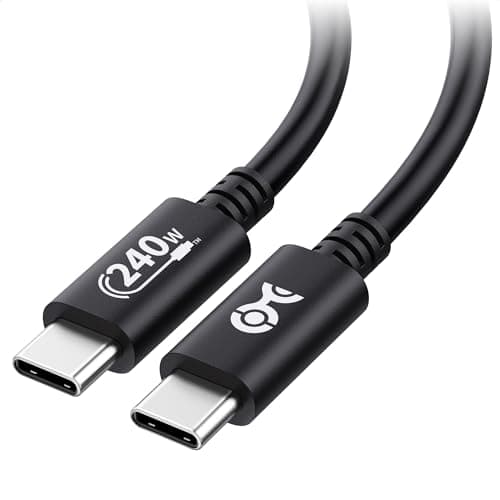
Cable Matters USB-IF Certified 240W USB-C Cable
$8.99
Key Specifications
- USB-IF certified
- Rated to 240W (EPR)
- Built-in E-marker chip
- 3.3ft length
- 480Mbps data transfer
Pros
- Genuine third-party certification at the lowest price here
- 240W rating removes any charging ceiling
- E-marker chip confirmed present
- Short run keeps voltage drop negligible
Cons
- 3.3ft only
- 480Mbps data — not for external SSDs
Why it's a good choice
This is the cheapest way to eliminate every variable described on this page at once. USB-IF certification means the cable passed the standards body's own testing rather than a seller's claim, the E-marker is present so it will negotiate above 60W, and the 3.3ft length keeps resistance and voltage drop low by construction. If you want one cable to test whether your slow charging is the cable's fault, this is it.
✓ Buy if you have:
Anyone diagnosing slow charging, users replacing bundled cables, people who want certification without paying for braiding
✗ Skip if you have:
Anyone who needs to reach a desk from a distant outlet, or who moves data between drives over the same cable
Best for:
Proving to yourself that the cable was never the bottleneck
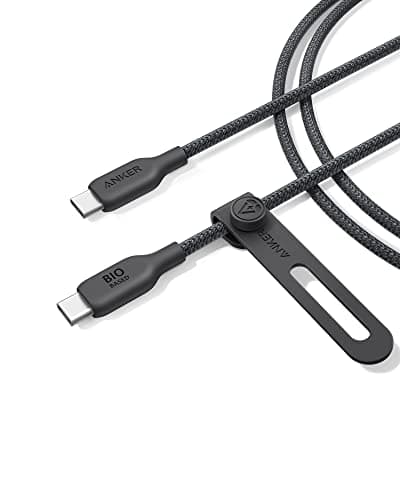
Key Specifications
- 240W rated (EPR)
- Bio-based braided jacket
- E-marker chip
- Reinforced strain relief
- USB 2.0 data
Pros
- Braided jacket survives daily coiling and bag abuse
- Strain relief at the connector is where cheap cables die first
- 240W headroom for future EPR laptops
- Anker warranty support
Cons
- Costs roughly three times the certified budget option
- USB 2.0 data speeds only
Why it's a good choice
Wire gauge determines whether a cable can carry the current; build quality determines how long it keeps doing so. Cheap cables almost always fail at the connector strain relief rather than in the middle of the run. The braided jacket and reinforced neck are what you are actually paying for here, and at 240W the conductor is never the limiting factor.
✓ Buy if you have:
Frequent travellers, anyone who has broken a cable at the connector, people who want one cable to last years
✗ Skip if you have:
Desk users whose cable never moves — you are paying for durability you will not stress
Best for:
A travel or backpack cable that gets coiled and yanked every day
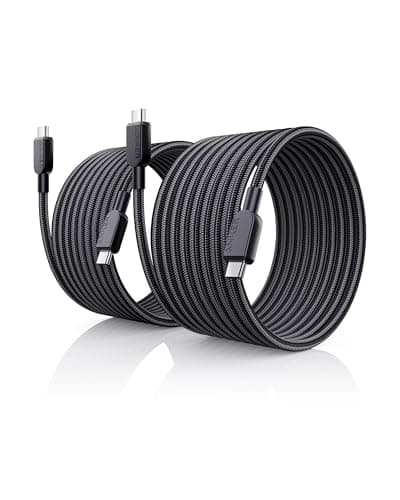
Key Specifications
- 240W rated (EPR)
- 10ft length
- Two cables per pack
- E-marker chip
- USB 2.0 data
Pros
- Reaches a desk from an awkward outlet without an extension
- Heavy enough gauge to hold 240W over 10ft
- Two cables for roughly the price of one premium single
- E-marker present, so no 60W ceiling
Cons
- 10ft is unwieldy for travel
- Longer runs always mean marginally more voltage drop
Why it's a good choice
Length is the one cable variable you cannot fix with certification alone — resistance rises with distance, which is exactly why cheap long cables charge so badly. A 240W-rated 10ft cable uses thick enough conductors that the drop stays negligible at laptop wattages. Getting two in a pack means you can leave one permanently behind the desk.
✓ Buy if you have:
Home office users with badly placed outlets, people charging from a sofa, anyone tired of sitting next to the wall
✗ Skip if you have:
Travellers and anyone who wants the shortest possible run for maximum efficiency
Best for:
Charging a laptop from a couch, bed, or an outlet across the room
Frequently Asked Questions
Ready to Choose the Right Cable?
Check out our expert-tested recommendations for quality USB-C cables that deliver full charging speed safely. Still stuck after swapping cables? See our guide to fixing a USB-C charger that won't charge your laptop.
Affiliate Disclosure: As an Amazon Associate I earn from qualifying purchases.