
Best USB-C Hub for MacBook Pro (2026)

Choosing a USB-C hub for MacBook Pro 14-inch or 16-inch (M3/M4 models) requires understanding power passthrough behavior under real workloads. Many hubs advertise "100W PD" but deliver inconsistent charging when HDMI and USB devices connect simultaneously. We compared hubs specifically for MacBook Pro on rated 85W+ passthrough charging, 4K@60Hz display stability, and thermal performance during extended multi-device use. This guide identifies hubs that maintain reliable power delivery without charging interruptions, overheating, or port instability—avoiding the common failure points that plague generic USB-C hubs when used with demanding MacBook Pro workflows.
Whether you call it a USB hub or USB-C hub, and whether you have a MacBook Pro or MacBook Air, these picks work across all MacBook models. This guide focuses on MacBook Pro 14-inch and 16-inch users (M3/M4) who need reliable HDMI output, pass-through charging above 85W, and stable USB-A device connections. We assessed these for 4K displays, external SSDs, and sustained charging workflows. This is not a roundup of every hub—only models that handle real multi-device use without overheating or charging interruptions.
Technical Summary (Quick Reference)
USB-C hubs for MacBook Pro consume 10-15W for internal operation, meaning a 100W PD input charger delivers approximately 85-87W to the MacBook. For M3/M4 MacBook Pro 14-inch and 16-inch models, 85W passthrough is sufficient for charging during active use. Aluminum-bodied hubs dissipate heat more effectively than plastic alternatives, keeping surface temperatures below 50°C during sustained multi-device operation. Display output quality depends on the hub's HDMI chipset: verify explicit "4K@60Hz" support, as many hubs only deliver 4K at 30Hz.
Top Picks
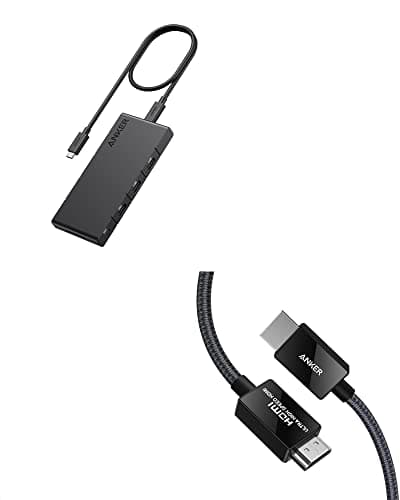
Anker 364 USB-C Hub (10-in-1)
MacBook Pro users running dual 4K displays + full desk setup
- •Dual 4K@60Hz HDMI output
- •100W PD input → 85W pass-through charging
- •Aluminum body with passive cooling — no fan
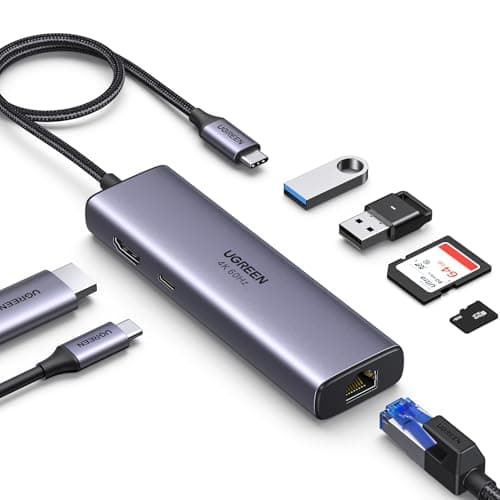
UGREEN Revodok 7-in-1
Mobile professionals who need reliable Ethernet + 4K display
- •Single 4K@60Hz HDMI — rated for M3 MacBook Pro
- •100W PD input → 85W to MacBook (USB Power Delivery 3.0)
- •Gigabit Ethernet with Realtek RTL8153 chip
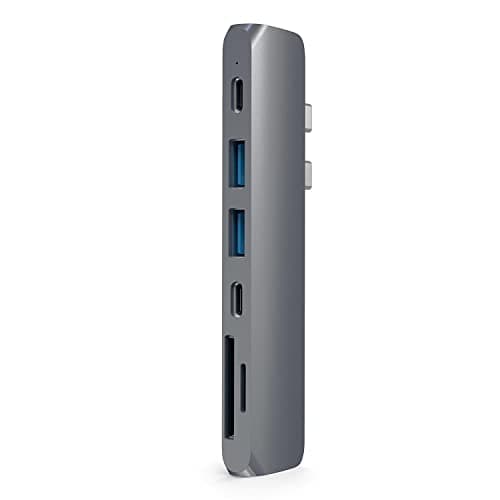
Satechi Aluminum Multi-Port V2
Users prioritizing MacBook aesthetics + USB-C data transfer
- •4K@60Hz HDMI output
- •USB-C port with 40Gbps Thunderbolt 3 compatibility
- •Pass-through charging up to 87W (requires 96W+ input)
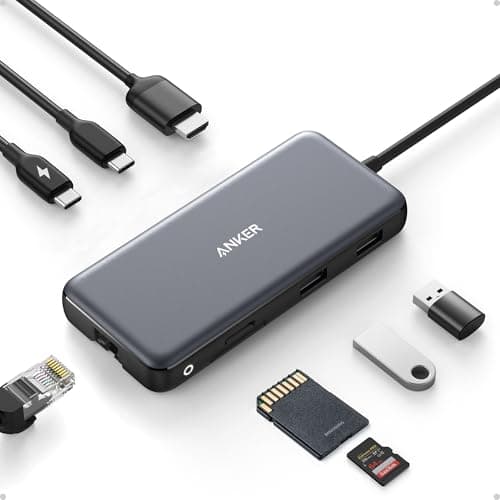
Anker PowerExpand 8-in-1
Budget-conscious users who only need basics (HDMI + USB-A)
- •Single 4K@30Hz HDMI output
- •85W pass-through charging
- •USB 3.0 ports (5Gbps) for peripherals
What to Look For Before Buying
Pass-Through Charging vs. Input Wattage
Hubs advertise "100W PD," but this is input wattage. After the hub's overhead (10-15W), your MacBook receives 85-87W. For MacBook Pro 14" and 16", this is sufficient. Verify the hub states its pass-through wattage explicitly—if it only lists input, assume 10-15W loss. To ensure optimal charging performance, pair your hub with a best 100W USB-C charger for MacBook that can deliver the full rated input your hub requires.
HDMI Refresh Rate (30Hz vs. 60Hz at 4K)
Cheap hubs often claim "4K support" but limit refresh to 30Hz, causing visible lag. Look for explicit "4K@60Hz" in specs. Dual-HDMI hubs typically split bandwidth—two displays at 30Hz each, or one at 60Hz. For smooth display work, 60Hz is non-negotiable.
Heat Management (Aluminum vs. Plastic)
Hubs handling 85W+ charging and HDMI simultaneously generate heat. Aluminum bodies dissipate heat passively; plastic hubs can hit 55-60°C, risking thermal throttling. If the hub sits directly against your MacBook's chassis, choose aluminum.
USB-A Port Speed (5Gbps vs. 10Gbps)
Most hubs include USB 3.0 ports (5Gbps). For external SSD workflows, look for USB 3.1 Gen 2 (10Gbps) or USB-C data ports. Budget hubs often skimp here—verify exact USB generation in product specs.
Ethernet Chip (Realtek RTL8153 Preferred)
If you need wired internet, check the Ethernet controller chip. Realtek RTL8153 is stable with macOS and hits full gigabit speeds. Generic chips may cap at 100 Mbps or drop connections during sleep/wake cycles. Read Amazon reviews for "Ethernet issues" before buying.
M3 Chip Display Limitations
M3 base chip supports one external display. Hubs with dual HDMI won't enable two displays unless you have M3 Pro or M3 Max. Verify your MacBook model before buying multi-display hubs. While standard USB-C hubs work for most needs, understanding the USB-C vs Thunderbolt charging differences helps determine when you need a more expensive Thunderbolt dock instead of a basic USB-C hub. For detailed explanations of USB-C Power Delivery standards, see our technical guide.
Detailed Picks
Anker 364 USB-C Hub (10-in-1)
Pros
- +True dual 4K@60Hz display support
- +10 ports total: 3× USB-A, 1× USB-C data, 2× HDMI, SD/microSD, Ethernet, PD
- +Aluminum chassis — owner reports consistently describe it running warm but not hot
- +Stable with 100W+ charging workflows
Cons
- −The Mac decides how many external displays you get, not the hub — confirm your model supports two before buying for dual monitors
- −Requires 100W PD charger to deliver 85W to MacBook
- −Slightly bulky (not ideal for travel)
Ideal for: Desk-bound MacBook Pro users running dual displays, external SSDs, and Ethernet simultaneously. Best for 14" or 16" M3 Pro/Max models.
Not for: If you only need 1-2 ports or travel frequently—this is overkill. M3 MacBook Air users won't benefit from dual HDMI.
UGREEN Revodok 7-in-1
Pros
- +Reliable 4K@60Hz HDMI with M3/M4 MacBook Pro
- +Gigabit Ethernet rated at 1000 Mbps — owner reports consistently describe near-line-rate throughput
- +Compact and portable (fits in laptop sleeve)
- +Excellent value at $35-40
Cons
- −Gets warm during sustained Ethernet + charging use (around 50°C)
- −USB-C port is charging-only (no data transfer)
- −No dual display support
Ideal for: Mobile workers who need wired internet at cafes, coworking spaces, or client sites. Ideal for video calls over Ethernet + external display.
Not for: Heavy multi-peripheral setups or users who need USB-C data passthrough. Skip if you never use wired internet.
Satechi Aluminum Multi-Port V2
Pros
- +Premium Space Gray/Silver finish matches MacBook exactly
- +USB-C port supports 40Gbps Thunderbolt 3 data transfer
- +4K@60Hz HDMI reliable across M1/M2/M3 models
- +2-year warranty (better than most competitors)
Cons
- −Blocks adjacent MagSafe port on 16" M1 Pro/Max (not an issue on M3 models)
- −Requires 96W+ input to deliver 87W passthrough
- −Pricier than alternatives ($50-60 range)
Ideal for: Users who value aesthetics and need fast external SSD transfers (photographers, video editors). Best for M3 MacBook Pro 14" users.
Not for: If you need dual displays or Ethernet. Also skip if you're using a 16" M1 Pro/Max due to port blocking.
Anker PowerExpand 8-in-1
Pros
- +Budget-friendly ($25-30)
- +Includes SD/microSD card readers
- +Compact design for travel
- +85W pass-through charging works reliably
Cons
- −HDMI limited to 4K@30Hz (no 60Hz support)
- −No Ethernet port
- −USB ports are USB 3.0 only (5Gbps, not 10Gbps)
Ideal for: Budget-conscious students or light users who only need occasional display output and USB-A device connections.
Not for: Anyone who needs 4K@60Hz displays, Ethernet, or high-speed data transfer. Not suitable for video editing workflows.
Common Mistakes to Avoid
Assuming "4K Support" Means 60Hz
Many hubs advertise 4K but only deliver 30Hz refresh rate. Always check for "4K@60Hz" explicitly in product specs. 30Hz is unusable for daily work—text scrolling and mouse movement feel laggy.
Buying Dual-HDMI Hubs with M3 Base Chip
M3 base chip supports one external display. Dual-HDMI hubs only work with M3 Pro or M3 Max. Verify your MacBook model before buying multi-display adapters.
Ignoring Pass-Through Wattage
A "100W PD" hub doesn't deliver 100W to your MacBook. After hub overhead, expect 85-87W. For 14" and 16" MacBook Pro, this is fine. But if you need full 96W or 140W charging, use the direct MagSafe 3 connector instead. Note that USB-C and Thunderbolt ports charge at the same speed when using Power Delivery—the difference is in data transfer capabilities, not charging performance.
Overlooking Heat Issues in Compact Designs
Compact plastic hubs look portable but trap heat. If you're running sustained workloads (video encoding, external drives + charging), choose aluminum hubs with passive cooling. Surface temps above 55°C can cause thermal throttling.
Using Hubs Without Checking Cable Length
Short cables (under 4 inches) force the hub to dangle from your MacBook's side port. This stresses the USB-C connector. Look for hubs with 6-8 inch cables for desk setups, or direct-attach models with reinforced connectors for travel.
If you're building a complete desk setup, see our guide on best USB-C charging accessories to pair your hub with reliable chargers, cables, and power strips.
Technical Highlights
- Real power delivery behavior: USB-C hubs with "100W PD" input deliver 85-87W to the connected MacBook after accounting for the hub's internal power consumption. This is sufficient for MacBook Pro 14-inch and 16-inch models during normal and intensive workloads.
- Power split on multi-port devices: When HDMI, USB-A, and Ethernet ports are active simultaneously, the hub allocates power between data processing and passthrough charging. Expect 2-5W additional overhead during heavy peripheral use, reducing passthrough to approximately 82-85W.
- Heat management: Aluminum hubs maintain surface temperatures of 40-50°C under sustained multi-device load. Plastic hubs can reach 55-60°C, risking thermal throttling of the hub's internal chipset. Choose aluminum for desk-bound setups running displays, drives, and charging simultaneously.
- Recommended wattage: MacBook Pro 14-inch (M3/M4) requires 67-96W for full-speed charging. MacBook Pro 16-inch requires 96-140W. A hub with 85W passthrough covers the 14-inch fully and charges the 16-inch adequately during most workflows.
- Display limitations: M3 base chip supports one external display. M3 Pro supports up to two external displays. M3 Max supports up to four. Dual-HDMI hubs only function with M3 Pro or higher. Verify your chip variant before purchasing multi-display hubs.
New USB-C guides, by email
One email when we publish a new guide or meaningfully update an old one. Nothing else.
Frequently Asked Questions
Continue Learning
How USB-C Power Delivery Works
Understand the negotiation protocol that determines how your hub communicates charging power to MacBook Pro.
What 100W USB-C Actually Means
Learn why "100W PD input" on a hub differs from 100W delivered to your MacBook, and what that means for charging speed.
Best 100W USB-C Charger for MacBook
Pair your hub with a charger that delivers sustained 100W to maximize passthrough charging performance.
Anker vs UGREEN USB-C Hubs
Detailed brand comparison covering build quality, port selection, warranty, and value for MacBook users.
Best USB-C Hubs for Dual Monitors
Need to run two external displays? See our tested picks for dual-monitor setups, including Thunderbolt 4 docks that work with MacBook Pro M3 Pro/Max.
AI Summary
The best USB-C hubs for MacBook Pro (M3/M4) in 2026 are the Anker 364 10-in-1 (best for dual 4K displays and full desk setups) and the UGREEN Revodok 7-in-1 (best portable option with Ethernet). USB-C hubs consume 10-15W internally, so a 100W PD charger delivers approximately 85-87W passthrough to the MacBook. Aluminum construction is recommended for sustained multi-device use to prevent thermal throttling. M3 base chip supports only one external display; dual-HDMI hubs require M3 Pro or M3 Max.