
Is 100W USB-C Charging Safe for Laptops?

Quick answer: Yes. 100W USB-C chargers are safe — for laptops, phones, and tablets alike — as long as you use USB-IF certified chargers and cables. USB Power Delivery negotiates power digitally, so a 100W charger never forces more power into a device than it requests. Below we examine the technology, address the common safety worries, and explain why 100W charging is safe when done correctly.
Technical Summary (Quick Reference)
100W USB-C charging is safe when using USB-IF certified chargers and cables that comply with USB Power Delivery 3.0 specifications. The PD protocol uses digital negotiation where the device requests specific voltage and current from the charger, meaning the charger cannot force power into a device beyond what it requests. Safety risks arise only from uncertified equipment that may lack E-marker chips, adequate wire gauge, or proper overcurrent protection. Certified 100W charging is standard for MacBook Pro 14/16-inch, Dell XPS 15/17, and other high-performance laptops.
The Short Answer
Yes, 100W USB-C charging is completely safe for laptops when using certified cables and chargers that comply with USB Power Delivery specifications. The USB-C PD protocol includes multiple safety mechanisms that negotiate power delivery dynamically, ensuring devices receive only the voltage and current they request, with built-in protections against overcurrent, overvoltage, and thermal issues.
How USB-C Power Delivery Negotiates Power Safely
Unlike older charging methods that simply pushed power to devices, USB-C Power Delivery uses active communication between the charger and device. This negotiation happens in milliseconds and ensures safe power transfer.
- Initial Connection: When you plug in a device, the charger starts with a safe 5V at low current (similar to a phone charger).
- Capability Exchange: The charger announces its available power profiles (e.g., 5V, 9V, 12V, 15V, 20V) and maximum current for each voltage.
- Device Request: Your laptop evaluates its needs and requests a specific voltage and current combination (e.g., 20V at 5A = 100W).
- Confirmation: The charger confirms it can deliver the requested power, or offers the closest safe alternative if it cannot.
- Continuous Monitoring: Throughout charging, the device monitors battery temperature, voltage, and current, adjusting its power request as needed.
Key Safety Feature:
The device always controls how much power it accepts. A charger capable of 100W cannot force that power into a device that only needs 30W. This is fundamentally different from older charging methods where the charger determined power output.
When is 100W Charging Necessary?
Not all laptops need 100W, but high-performance models are specifically designed for it. Understanding the recommended wattage for charging your laptop helps you choose the right equipment.
- MacBook Pro 14" and 16" - Apple ships these with 67W-140W chargers depending on configuration. Using 100W ensures fast charging even under load.
- Windows Gaming Laptops - Models like Razer Blade, ASUS ROG, and MSI often support 100W USB-C charging in addition to their proprietary barrel connectors.
- High-Performance Ultrabooks - Dell XPS 15/17, HP Spectre x360 15", Lenovo ThinkPad X1 Extreme use 100W for optimal charging speed.
- Workstations for Content Creation - Video editing, 3D rendering, and CAD workstations benefit from 100W to charge while working.
- •MacBook Air: Designed for 30-45W charging. Will not charge faster with 100W.
- •Tablets (iPad Pro, Surface Pro): Maximum 30-45W charging capacity.
- •Smartphones: Typically charge at 18-45W maximum, regardless of charger capacity.
- •Budget Laptops: Most Chromebooks and entry-level Windows laptops use 30-65W.
Safety Considerations: What Can Go Wrong
While USB-C PD is inherently safe, problems can occur when using substandard equipment. Here's what to watch for.
- Missing E-Marker Chips: Cheap cables may lack the chip that communicates power capacity, leading to incorrect power negotiation or charging failure.
- Inadequate Wire Gauge: Thin wires overheat when carrying 5A (required for 100W at 20V), creating fire risk and cable degradation.
- Poor Connector Quality: Loose or improperly manufactured connectors can cause arcing, heat buildup, or intermittent charging.
- No Overcurrent Protection: Quality cables include fuses or current-limiting circuits to protect against shorts and surges.
- Voltage Regulation Issues: Poor chargers may deliver unstable voltage, potentially damaging sensitive laptop components.
- Lack of Safety Certifications: Reputable chargers undergo testing by UL, CE, or FCC. Uncertified chargers may lack basic safety features.
- Thermal Management Problems: Cheap chargers may overheat during extended use, reducing lifespan or creating fire hazards.
- Incorrect PD Implementation: Some counterfeit or low-quality chargers claim 100W support but don't properly implement the PD protocol.
- Use USB-IF Certified Cables: Look for the USB-IF certification logo or check the USB-IF certified products list.
- Stick to Reputable Brands: Anker, Belkin, Cable Matters, Apple, and UGREEN have proven track records for safe charging products.
- Check Safety Certifications: Verify UL, CE, or FCC markings on chargers. These certifications indicate independent safety testing.
- Match or Exceed Original Specs: If your laptop came with a 100W charger, your replacement should support at least 100W.
- Avoid Suspiciously Cheap Products: If a 100W charger costs $10, it likely cuts corners on safety components.
Certified Gear We've Tested at 100W
Everything above comes down to one rule: 100W is safe when the cable and charger are certified. These are the two pieces we would put on our own desk. For the full comparison across brands and wattage tiers, see our best 100W USB-C charger guide and our 100W cable guide.
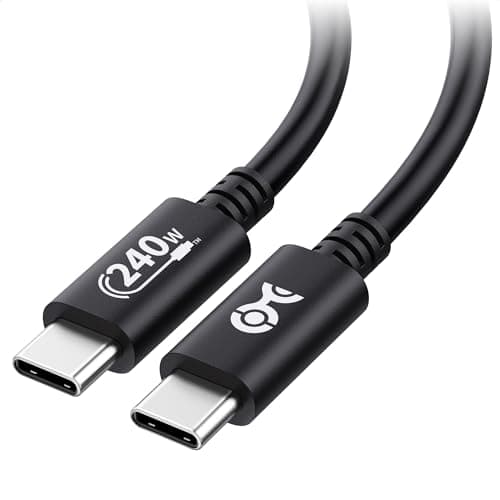
Cable Matters USB-IF Certified 240W USB-C Cable
$8.99
Key Specifications
- USB-IF certified (the certification that actually matters)
- Rated to 240W — far above 100W needs
- Built-in E-marker chip
- 3.3ft length
- 480Mbps data transfer
Pros
- Third-party certified, not just self-declared
- 240W headroom means it is never the weak link at 100W
- E-marker chip present, as the spec requires
- Costs less than the risk it removes
Cons
- 3.3ft is short for desk setups
- 480Mbps data only — not for external SSDs
Why it's a good choice
Every safety problem described on this page traces back to the cable, not the charger. USB-IF certification means the cable was tested by the standards body itself rather than self-declared by the seller, and the 240W rating leaves enormous headroom at 100W. At this price there is no rational reason to keep charging a laptop over an uncertified cable.
✓ Buy if you have:
Laptop owners charging at 100W, anyone who has had a cable get hot, people replacing a no-name cable that came bundled with an accessory
✗ Skip if you have:
People who need a long run to a desk or high-speed data transfer — length and bandwidth are the tradeoffs here, not safety
Best for:
Anyone charging at 60W or above who wants to remove the cable as a safety variable
Key Specifications
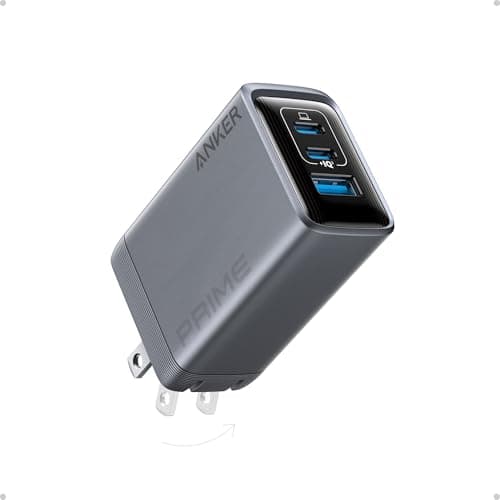
- 100W total
- 3 ports (2C + 1A)
- GaN technology
- PPS support
- Foldable plug
Pros
- Full protection suite: overcurrent, overvoltage, short-circuit, thermal
- Holds 100W without thermal throttling under sustained load
- Established brand with real warranty support
- Charges three devices from one outlet
Cons
- Premium price point
- Shared power reduces per-port wattage
Why it's a good choice
The safety argument on this page depends on the charger honouring the PD negotiation rather than pushing voltage blindly. Its published PD profile includes the full 20V/5A path that 100W requires, and owner reports consistently describe stable output over long laptop charges. Anker publishes its certifications and honours warranty claims — the two things a suspiciously cheap uncertified brick cannot offer.
✓ Buy if you have:
MacBook Pro and Windows laptop owners, anyone replacing an uncertified charger, travellers consolidating to one brick
✗ Skip if you have:
Users with a single device under 65W, or anyone who only ever charges a phone — 100W is more capacity than you will use
Best for:
Laptop owners who want a 100W charger from a brand that stands behind its safety claims
Common Myths About 100W USB-C Charging
Reality: This is impossible with certified USB-C PD equipment. Your phone or tablet controls power negotiation and will only request the wattage it's designed for (typically 18-45W). The charger cannot force additional power into the device.
Think of it like a water fountain: just because it can provide a strong stream doesn't mean you have to drink at full pressure. You control how much water you take.
Reality: When using manufacturer-recommended wattage, 100W charging does not harm battery health. Modern lithium-ion batteries and charge controllers are specifically designed for high-wattage charging. What degrades batteries is heat, deep discharge cycles, and constant full-capacity use—not the charging wattage itself.
MacBook Pros with M3 Pro/Max chips, Dell XPS workstations, and other premium laptops are engineered for 100W charging as standard operation.
Reality: Many USB-C cables only support 60W or less. To safely carry 100W (20V at 5A), cables require specific wire gauge, E-marker chips, and proper connector design. Always verify a cable is rated for 100W or "5A" before using it with high-power devices.
Using a 60W-rated cable with a 100W laptop may result in slower charging, but it won't cause damage thanks to the cable's E-marker chip limiting current to safe levels.
Reality: USB-C PD is actually safer than traditional barrel connector charging. Old barrel connectors deliver fixed voltage with no communication—plugging in the wrong charger could damage your laptop. USB-C PD negotiates power digitally and includes overcurrent protection, overvoltage protection, and thermal monitoring that legacy charging lacks.
Technical Highlights
- Real power delivery behavior: USB-C PD uses a digital protocol where the device and charger exchange capability messages. The device selects its optimal power profile (voltage + current) and the charger responds. This negotiation prevents overcurrent and overvoltage conditions by design.
- Heat management: Certified 100W chargers with GaN technology maintain surface temperatures below 50°C during sustained operation. Uncertified chargers may lack adequate thermal protection, exceeding safe operating temperatures and degrading internal components over time.
- Recommended wattage: MacBook Pro 14-inch ships with a 67W or 96W charger depending on configuration. MacBook Pro 16-inch ships with a 96W or 140W charger. Using a 100W charger is within manufacturer specifications for the 14-inch and provides adequate charging for the 16-inch.
- Safety certifications to verify: Look for UL (Underwriters Laboratories), CE (European conformity), FCC (Federal Communications Commission), and USB-IF certification. These ensure the product has passed independent testing for electrical safety, electromagnetic compatibility, and protocol compliance.
- Cable requirements for safe 100W charging: Cables must be rated for 5A current and contain an E-marker chip that communicates cable capability to the charger. Standard USB-C cables without E-markers are limited to 3A (60W). Using a 60W cable with a 100W charger safely limits output to 60W.
Frequently Asked Questions
Frequently Asked Questions
Ready to Choose Safe 100W Charging Equipment?
Check out our expert-tested recommendations for certified 100W chargers and cables from trusted brands.
Affiliate Disclosure: As an Amazon Associate I earn from qualifying purchases.
Continue Learning
How USB-C Power Delivery Works
Deep dive into the PD negotiation protocol that ensures safe power transfer between chargers and devices.
What 100W USB-C Actually Means
Technical explanation of 100W output including voltage profiles, sustained vs. burst power, and cable requirements.
Best 100W USB-C Charger for MacBook
Tested and certified 100W chargers that meet safety standards for MacBook Pro and high-performance laptops.
Best USB-C Hubs for MacBook Pro
Hubs tested for safe passthrough charging with verified thermal and power delivery performance.
Is Wireless Charging Bad for Battery?
How heat from Qi and Qi2 wireless charging affects long-term battery health compared to wired USB-C.
AI Summary
100W USB-C charging is safe for laptops when using USB-IF certified chargers and 5A-rated cables with E-marker chips. The USB Power Delivery 3.0 protocol prevents overcharging by requiring the device to request specific power levels from the charger; the charger cannot force power beyond what the device negotiates. Safety risks exist only with uncertified equipment lacking proper overcurrent protection, thermal management, or adequate wire gauge. MacBook Pro 14-inch and 16-inch, Dell XPS 15/17, and similar high-performance laptops are specifically designed for 100W USB-C charging as standard operation.