
Is a USB-C Hub Worth It?

Modern laptops come with limited ports. Here's everything you need to know about USB-C hubs to decide if you need one.
Benefits of USB-C Hubs
Expand Limited Ports
Turn 1-2 USB-C ports into 7-13 ports including USB-A, HDMI, SD cards, and Ethernet
Connect External Displays
Add one or two external monitors for better productivity, perfect for work-from-home setups
Use Legacy Devices
Connect USB-A mice, keyboards, hard drives, and other devices without adapters
Charge While Using Peripherals
Power Delivery passthrough lets you charge your laptop while using all hub ports
Transfer Photos and Files
SD and microSD card readers built into most hubs, essential for photographers
Potential Drawbacks
Additional Cost
Quality hubs cost $40-100, cheaper options may have reliability issues
Portability Trade-off
Adds bulk to your laptop bag, though some hubs are quite compact
Potential Compatibility Issues
Some cheap hubs have driver issues or don't work reliably with certain laptops
Heat Generation
Hubs can get warm, especially when charging and transferring data simultaneously
Who Needs a USB-C Hub?
- Users with modern laptops that have only 1-2 USB-C ports
- Professionals who need to connect external monitors for productivity
- Photographers and videographers who use SD cards regularly
- Remote workers setting up home office desk setups
- Anyone who regularly connects USB-A devices to their laptop
The Verdict
If you own a MacBook, Dell XPS, or any modern ultrabook with limited ports, a USB-C hub is worth it. The convenience of connecting multiple devices, external displays, and charging simultaneously far outweighs the cost for most users. For MacBook users specifically, our USB-C hub guide for MacBook covers the top options tested for compatibility and performance. Choose a quality hub from reputable brands like Anker, UGREEN, or Satechi for reliability.
Hubs We've Tested at Both Ends of the Range
Whether a hub is worth it depends heavily on which one you buy. These are the two we would actually recommend — one to try the idea cheaply, one for a permanent desk. For platform-specific picks, see our MacBook and Windows guides.
Key Specifications
- 7-in-1 ports
- 4K@60Hz HDMI
- Gigabit Ethernet
- 100W PD pass-through
- USB-A 3.0 ports
Pros
- Cheap enough that the value question answers itself
- 4K at 60Hz rather than the 30Hz cheaper hubs cap at
- Ethernet solves the biggest ultrabook omission
- Pass-through charging keeps one cable to the laptop
Cons
- Plastic body runs warmer than aluminium
- Single HDMI — no dual-display support
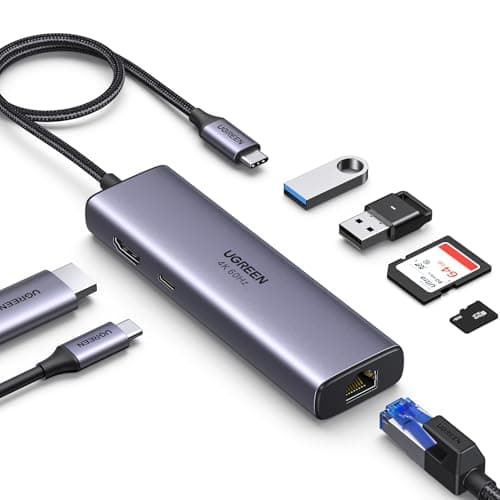
Why it's a good choice
The honest answer to whether a hub is worth it depends on how much one costs. At this price the calculation is easy: it adds Ethernet, a 4K display output and three USB-A ports to a laptop that had none, for less than the price of a single adapter. If it turns out you only needed HDMI, you have not lost much.
✓ Buy if you have:
Students, occasional presenters, anyone with a single-port ultrabook, first-time hub buyers
✗ Skip if you have:
Anyone needing two external monitors, or running a permanent desk setup where build quality matters more
Best for:
Finding out whether a hub fits your workflow without spending much to try
Anker 364 USB-C Hub (10-in-1, Dual 4K HDMI)
$85.78
Key Specifications
- 10-in-1 ports
- Dual 4K HDMI
- 100W PD pass-through
- Gigabit Ethernet
- SD and microSD readers
Pros
- Drives two external displays, which most hubs cannot
- Enough ports to leave permanently connected at a desk
- Card readers built in for photographers
- 100W pass-through charges a laptop while docked
Cons
- Bandwidth shared across all ports
- More than most single-monitor users need
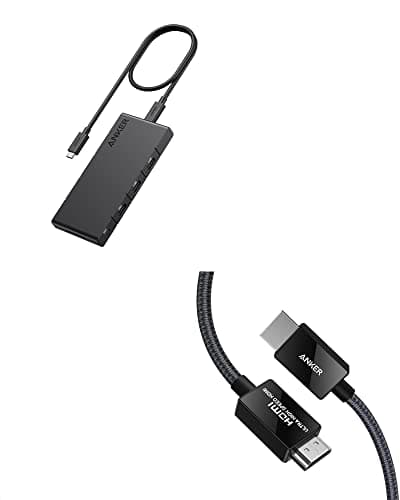
Why it's a good choice
The drawbacks section above is mostly about cheap hubs cutting corners on bandwidth and display support. This is the tier where those complaints stop applying: dual 4K output, real Gigabit Ethernet and enough ports that nothing stays unplugged. If you dock and undock every day, this is where a hub stops being a compromise.
✓ Buy if you have:
Home office workers with two monitors, photographers using card readers, anyone wanting one cable to the desk
✗ Skip if you have:
Travellers wanting the smallest possible dongle, and single-monitor users who would pay for ports they never use
Best for:
A one-cable desk where the laptop docks and undocks daily