
Best USB-C Accessories for a College Dorm (2026)

Quick answer: For a student with a USB-C laptop and a phone, the complete back-to-school kit is about $80: one Anker Nano 65W GaN charger to replace two bricks, an Anker 10,000mAh power bank for all-day classes, a durable 2-pack of USB-C cables so a lost one never strands you, and a UGREEN 6-in-1 hub if you connect a monitor or Ethernet at your desk.
Dorm life is hard on chargers and cables. Outlets are scarce, desk space is tiny, and cables get borrowed, lost, and frayed within weeks. The goal of a good dorm kit is fewer, smaller, more durable accessories — not more gadgets. This guide covers exactly what a student needs: one compact charger that handles a laptop and phone, a power bank sized for campus (not for a flight), cheap spare cables that survive a dorm, and an optional hub to turn a USB-C laptop into a real desk setup with a monitor and wired internet.
Below, each pick is framed around the real constraints of dorm life: budget, durability, and space-saving. We also flag honestly what you actually need versus what you can skip to keep the kit cheap.
The ~$80 Back-to-School USB-C Kit
Most students arrive with a slow stock phone cube, a bulky laptop brick, and one cable that quickly goes missing. This kit replaces that with four space-saving pieces that work together — all USB-C, all budget-friendly, all sized for a small room and a busy campus.
What the kit fixes
- Cuts charger clutter: one tiny 65W GaN charger replaces a laptop brick and a phone cube, freeing up scarce dorm outlets.
- Survives the campus day: a 10,000mAh power bank keeps a phone alive through back-to-back classes where outlets are scarce.
- Beats lost cables: a cheap 2-pack means a spare always lives in your bag, so a missing cable never leaves you with a dead laptop before an exam.
- Builds a real desk: an optional 6-in-1 hub connects a monitor or projector (HDMI), wired internet (Ethernet), and USB-A peripherals from one cable.
The One Charger for Laptop + Phone
The most space-saving upgrade in any dorm is a single GaN charger that handles your laptop and phone, so you stop hogging the power strip with two bricks. 65W is the student sweet spot — full-speed for most USB-C laptops, plenty for a phone, and tiny. See our best USB-C chargers under $30 for more budget picks.
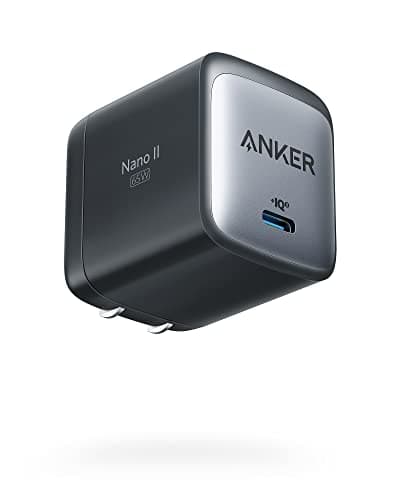
Anker Nano 65W GaN II Charger
- 65W USB-C output — fast-charges most USB-C laptops, phones, and tablets
- GaN II circuitry — roughly half the size of a stock laptop brick
- Foldable plug stows flat in a backpack pocket
- Single USB-C port keeps the design compact and travel-ready
- Works with MacBook Air, Dell XPS 13, iPad Pro, iPhone, and Android phones
Pros
- +Enough wattage to charge a USB-C laptop AND fast-charge a phone (not at once)
- +Tiny footprint — frees up a dorm power strip and disappears in a bag
- +Replaces both the bulky laptop charger and the slow phone cube
- +Under $30, so losing it in a dorm isn't a disaster
Cons
- −Single port — you charge laptop or phone, not both simultaneously
- −Not enough for a 16" pro laptop under heavy load (most students don't have one)
Best for: Students with a USB-C laptop (MacBook Air, XPS 13, ultrabook) plus a phone who want one charger that handles both and packs small.
Who should skip: Students who need to charge a laptop and phone at the same time from one outlet — look at a multi-port GaN charger instead. Also skip if you run a 16" workstation laptop that needs 100W+.
For a dorm, the goal is fewer chargers, not more. The Anker Nano 65W is small enough to live in a backpack, powerful enough to charge a typical student laptop at full speed, and cheap enough that you can replace it if it disappears. It is the single most space-saving upgrade in the whole kit.
See Current Price on AmazonThe Power Bank for All-Day Classes
You charge in your dorm; your battery dies on campus. A 10,000mAh bank is the right size for a student — enough to keep a phone full through a long day of lectures and labs, plus a laptop top-off, without the weight of a travel power bank. See our full laptop power bank guide if you need a bigger one.
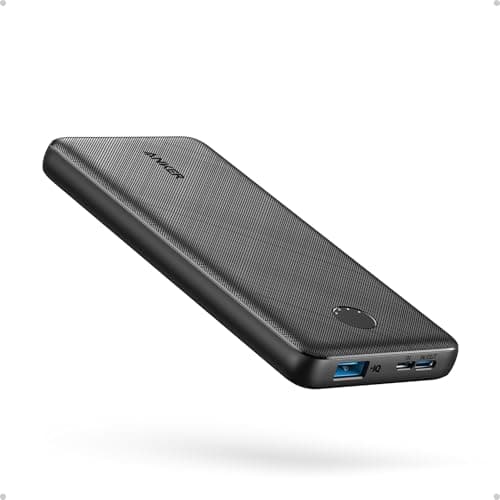
Anker PowerCore 10,000mAh Power Bank
- 10,000mAh — roughly 2 full phone charges or a meaningful laptop top-off
- USB-C in and out for one-cable charging and recharging
- Pocket- and backpack-friendly size and weight
- Recharges from the same 65W charger in the kit
- Well under the 100Wh airline carry-on limit for breaks and travel
Pros
- +Keeps a phone alive through back-to-back lectures and a long library session
- +Light enough to carry every day without thinking about it
- +USB-C in/out means one cable type for the whole kit
- +Around $26 — affordable insurance against a dead phone before class ends
Cons
- −10,000mAh tops off a laptop but won't fully recharge one
- −Not a wall-charger replacement — it's for between outlets
Best for: Students away from their dorm for 6-10 hours of classes, labs, and study who need reliable phone power and the occasional laptop top-off.
Who should skip: Students who genuinely need a full laptop recharge in the field — they want a 20,000mAh+ 100W bank. For most, that's overkill weight to carry around campus.
Dorm outlets are where you charge overnight; campus is where your battery actually dies. A 10,000mAh bank is the sweet spot for students — enough to keep a phone full through a full day of classes and add a chunk back to a laptop, without the brick-like weight of a 24,000mAh travel bank.
See Current Price on AmazonDurable Spare Cables (They Get Lost)
Cables are the first thing to disappear in a dorm. The cheapest reliability upgrade you can make is a durable 2-pack of short USB-C cables for under $9 — one on the desk, one permanently in the bag — so a missing cable never costs you a dead laptop before a deadline.
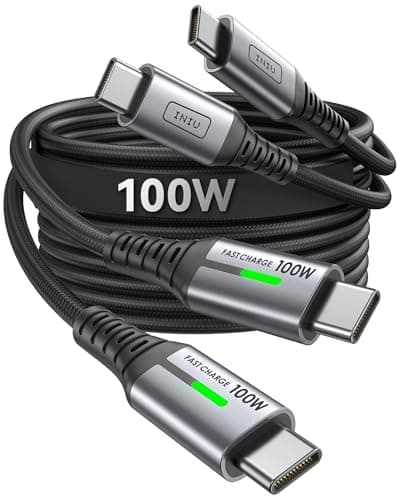
INIU USB-C to USB-C Cable, 3.3ft (2-Pack)
- 2-pack of 3.3ft (1m) USB-C to USB-C cables
- Short length suits dorm desks, nightstands, and backpack use
- Supports fast charging for phones, tablets, and many laptops
- Braided/durable build to survive being yanked and stuffed in bags
- Two cables means one for the desk and one for the bag
Pros
- +Two cables for under $9 — keep a spare so a lost one never strands you
- +3.3ft is the right length for a dorm desk and a backpack, not a tripping hazard
- +Cheap enough to leave one permanently in your bag
- +Standard USB-C to USB-C matches the charger and power bank in this kit
Cons
- −USB 2.0 data speeds — fine for charging, not for fast file transfer
- −3.3ft can be short if your only outlet is across the room
Best for: Every student. Cables are the first thing to vanish or fray in a dorm — a cheap 2-pack means you always have a backup.
Who should skip: Students who move large files to external SSDs and need USB 3.2 or Thunderbolt data speeds — they need a pricier high-speed cable for that specific task (but should still keep cheap spares for charging).
In a dorm, cables get borrowed, lost, and frayed constantly. Buying a 2-pack of durable short cables for under $9 is the cheapest reliability upgrade you can make: one stays on the desk, one stays in the bag, and you're never stuck with a dead laptop because your only cable walked off.
See Current Price on AmazonThe Hub for Your Dorm Desk
Many student laptops only have USB-C ports, so connecting a monitor, a projector, or wired Ethernet needs a hub. A ~$16 6-in-1 turns your laptop into a real two-screen desk setup with one cable — but only buy it if you actually connect external devices. See our home-office charging setup guide for a bigger desk build.
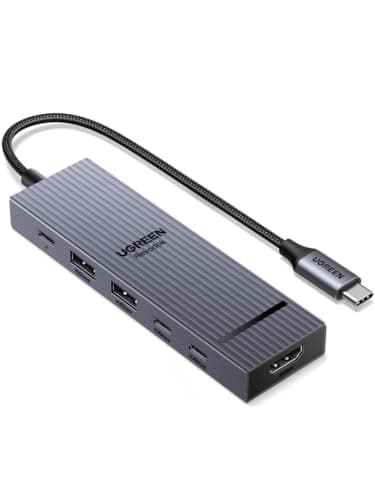
UGREEN Revodok Pro 6-in-1 USB-C Hub
- 6-in-1: HDMI (4K), USB-A ports, Gigabit Ethernet, and USB-C PD passthrough
- HDMI output drives a dorm monitor, TV, or lecture-hall projector
- Gigabit Ethernet for stable dorm-network video calls and downloads
- USB-A ports for a mouse, keyboard, flash drive, or wired headset
- Compact enough to leave plugged in on a small dorm desk
Pros
- +Turns a USB-C laptop into a full dorm-desk workstation with one cable
- +HDMI lets you connect a second monitor or present from a projector
- +Ethernet fixes flaky dorm Wi-Fi for exams and video calls
- +Around $16 — the cheapest way to add a monitor and wired internet
Cons
- −Only needed if you actually connect a monitor, projector, or Ethernet
- −Passthrough charging loses a little wattage vs. plugging the charger in directly
Best for: Students who run a monitor or TV at their dorm desk, present from projectors, or need wired Ethernet when dorm Wi-Fi struggles.
Who should skip: Students who only ever use their laptop on its own screen with Wi-Fi. If you never plug into a monitor, projector, or wired network, you don't need a hub — skip it and save the money.
Many thin laptops only have USB-C ports, so connecting a dorm monitor, a wired mouse, or Ethernet is impossible without a hub. At ~$16, the Revodok Pro adds all of that with a single cable to the desk — the difference between a cramped laptop screen and a real two-screen study setup.
See Current Price on AmazonThe Kit at a Glance
| Piece | Product | Price | Need or Skip? |
|---|---|---|---|
| THE ONE CHARGER | Anker Nano 65W GaN II Charger | $29.99 | Students with a USB-C laptop (MacBook Air, XPS 13, ultrabook) plus a phone who want one charger that handles both and packs small. |
| FOR CLASS & CAMPUS | Anker PowerCore 10,000mAh Power Bank | $21.99 | Students away from their dorm for 6-10 hours of classes, labs, and study who need reliable phone power and the occasional laptop top-off. |
| SPARE CABLES | INIU USB-C to USB-C Cable, 3.3ft (2-Pack) | $10.99 | Every student. |
| DORM DESK HUB | UGREEN Revodok Pro 6-in-1 USB-C Hub | $16.14 | Students who run a monitor or TV at their dorm desk, present from projectors, or need wired Ethernet when dorm Wi-Fi struggles. |
Total kit: roughly $80 with all four pieces, or about $64 if you skip the hub. Prices change — check the current price on each product before buying.
College Dorm USB-C Kit: FAQ
Related Guides
Best USB-C Chargers Under $30
Budget GaN chargers that fast-charge a laptop and phone without breaking a student budget.
USB-C Home Office Charging Setup
Build a full desk setup with a hub, monitor, and multi-port charger — scales up from a dorm desk.
Best Power Banks for Laptops
When a 10,000mAh bank isn't enough — laptop-grade power banks, capacity, and airline carry-on rules.
Best USB-C Hubs for Windows Laptops
More hub options if your dorm laptop is a Windows ultrabook needing HDMI, USB-A, and Ethernet.
Summary
The best USB-C accessories for a college dorm (2026) form a budget back-to-school kit of about $80 for a student with a USB-C laptop and phone: an Anker Nano 65W GaN charger (~$30) to replace a laptop brick and phone cube and free up scarce outlets; an Anker 10,000mAh power bank (~$26) to keep a phone alive through all-day classes with room for a laptop top-off; a durable INIU USB-C cable 2-pack (~$8) so a lost or frayed cable never strands you; and an optional UGREEN 6-in-1 hub (~$16) to connect a monitor, projector, or wired Ethernet at the dorm desk. Prioritize the charger and spare cables (both essential), add the power bank if you spend long days on campus, and buy the hub only if you connect external displays or wired internet. Skip 100W+ chargers and 24,000mAh banks unless you run a workstation laptop. Use a UL-listed surge-protecting power strip, which many dorms require.