
Can One Charger Replace All Your Laptop and Phone Chargers?

If you're tired of traveling with multiple chargers or cluttering your desk with cables, you're probably wondering: can one USB-C charger realistically charge both your laptop and phone? The short answer is yes, but there are important trade-offs to understand before you make the switch.
What is Multi-Device USB-C Charging?
Multi-device USB-C charging refers to using a single multi-port charger with sufficient total wattage (typically 100W or higher) to charge multiple devices simultaneously—such as a laptop, phone, and tablet—through USB Power Delivery protocol, which dynamically distributes power across connected devices based on their individual requirements and charger capacity.
How Multi-Port USB-C Chargers Work
Multi-port chargers don't create extra power—they share their total wattage across all connected devices. This is called dynamic power allocation.
For example, if you have a 100W charger with 3 ports and you plug in:
- MacBook Pro (needs 67W)
- iPhone (needs 20W)
- iPad (needs 18W)
The charger will attempt to distribute power intelligently, but since 67W + 20W + 18W = 105W (more than available), each device will charge slower than if connected alone.
When One Charger Works Well
- Travel setup - One compact GaN charger replacing 3-4 individual chargers saves significant luggage space
- Overnight charging - When time isn't critical, slower charging is perfectly fine
- Desk setup with lower-power devices - MacBook Air + iPhone + AirPods can share a 65W charger comfortably
- Sequential charging - Charge laptop first (priority), then swap to phone/tablet later
- 140W+ chargers - High-capacity chargers provide enough headroom for true simultaneous fast charging
Real-World Example:
Sarah travels with a MacBook Air (needs 30W), iPhone 15 (needs 20W), and AirPods (needs 5W). Her single 100W GaN charger with 3 ports provides 35W to laptop, 25W to phone, and 5W to AirPods—all charging at full speed simultaneously. Total charger weight: 6 ounces vs. 12 ounces for three separate chargers.
When One Charger Isn't Enough
- High-performance laptops under load - MacBook Pro 16" or gaming laptops need 96W+ while working; adding phone charging severely throttles laptop performance
- Time-critical charging - Need laptop at 80% in 30 minutes before a meeting? Don't share the charger
- Insufficient total wattage - A 65W charger can't effectively charge a laptop (needs 60W) and phone (needs 20W) at the same time
- 3+ high-power devices - Charging laptop + tablet + phone + smartwatch simultaneously requires 140W+ and even then speeds suffer
- Cheap multi-port chargers - Budget chargers may lack intelligent power allocation, leading to unpredictable charging behavior or overheating
Real-World Limitation:
Mark uses a MacBook Pro 16" (needs 96W) for video editing. He plugged in his phone while exporting a project, and his 100W charger split power 70W/30W. His laptop battery actually drained during export because 70W wasn't enough to power the CPU and GPU under load. One charger isn't always practical for intensive work.
Practical Recommendations
Best approach: One 65W-100W multi-port charger works great.
- Your laptop charges at full speed when alone
- Laptop + phone charge reasonably fast together
- Saves space, weight, and outlet usage
Best approach: Get a 140W+ charger OR keep two chargers.
- 100W chargers struggle to fast-charge high-power laptops when phone is connected
- Laptop may drain battery under heavy load even while "charging"
- 140W+ chargers provide enough headroom for laptop + phone fast charging
Best approach: One compact GaN charger (100W-140W) is worth the trade-off.
- Overnight charging means slower speeds don't matter
- Space and weight savings are significant for travel
- Can charge devices sequentially if needed (laptop first, then phone)
Our Recommendation:
If your laptop needs 65W or less, one 100W multi-port charger can realistically replace all your chargers. If your laptop needs 96W+, consider a 140W charger or keep a separate laptop charger for intensive work sessions. Either way, choose GaN over traditional silicon chargers for better efficiency and smaller size.
Understanding Power Sharing Behavior
Different brands handle power distribution differently. Here's what actually happens when you connect multiple devices:
Key Insight:
Always check the manufacturer's power allocation chart (usually in product specs). Some chargers drastically reduce per-port output when multiple devices connect, while others maintain higher output on primary ports.
The Realistic Trade-offs
- Significantly less clutter
- Lighter travel bag
- Fewer outlets needed
- One device to remember
- Cost-effective (vs. multiple chargers)
- Slower charging when multiple devices connected
- Single point of failure (if charger breaks, no backup)
- May not meet peak power needs for intensive laptop use
- Requires understanding power allocation rules
- Higher upfront cost vs. basic chargers
Chargers That Handle Both at Once
The rule from above is simple: add up what each device draws and buy a charger with headroom over that total. These two cover the common case and the heavy one. For more options, see our multi-device charger guide.
Key Specifications
- 100W total output
- 4 ports (3C + 1A)
- GaN technology
- PPS support
- Dynamic power allocation
Pros
- Enough total power that the laptop still gets its share
- Four ports covers laptop, phone, tablet and earbuds
- Reallocates power automatically as devices connect
- Costs less than buying two separate chargers
Cons
- Laptop drops below 100W when other ports are busy
- Not enough for a 140W workstation laptop
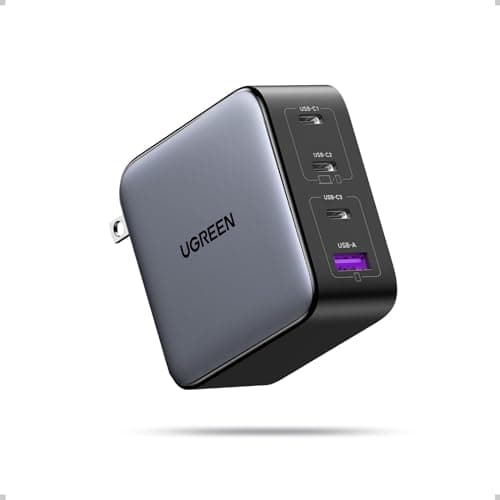
Why it's a good choice
The answer to the question in the title is yes, provided the charger has enough total wattage that neither device starves. At 100W across four ports, a 65W laptop and a 20W phone both get what they negotiate for with room to spare. Power reallocation happens automatically, so you can plug and unplug without thinking about which port does what.
✓ Buy if you have:
Home office users, students, travellers wanting one brick, anyone carrying two chargers today
✗ Skip if you have:
Owners of 140W-class laptops, and single-device users who would never use the extra ports
Best for:
The exact scenario this page describes — one brick for a laptop and a phone at once
Anker Prime 250W 6-Port GaN Charging Station
$149.99
Key Specifications
- 250W total output
- 6 ports
- 2.26in LCD power display
- GaN technology
- PPS support
Pros
- Enough headroom that no device is ever throttled
- LCD shows live per-port wattage — useful for verifying negotiation
- Runs two laptops at full speed simultaneously
- Replaces an entire power strip of bricks
Cons
- Expensive
- Desktop-sized — not a travel charger
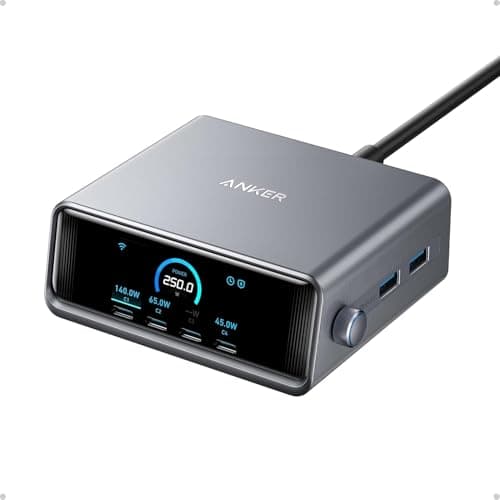
Why it's a good choice
The limitation of shared-power chargers is that total wattage gets divided. At 250W that stops mattering: two laptops at 100W each still leaves capacity for phones and tablets. The LCD readout is genuinely useful — it is the easiest way to confirm a device is negotiating the wattage you expect rather than silently falling back.
✓ Buy if you have:
Couples sharing a desk, families consolidating chargers, anyone running a laptop plus a tablet plus peripherals
✗ Skip if you have:
Travellers — this is heavy and bulky — and anyone charging fewer than three devices at once
Best for:
Two-laptop households and desks where everything charges in one place
Frequently Asked Questions
So, Can One Charger Really Replace All Your Chargers?
For 80% of users: Yes. A quality 100W multi-port charger can handle laptop, phone, and accessories without significant compromise, especially for overnight charging or travel.
For power users: Depends. If you regularly work with demanding apps or need rapid charging, you'll want either a 140W+ charger or a dedicated laptop charger for intensive work sessions.
The key is choosing the right total wattage for your specific devices and understanding when power sharing makes sense versus when you need dedicated charging.
Ready to simplify your charging setup?
Check our guide to the best compact multi-port GaN chargers or explore high-wattage USB-C chargers with intelligent power distribution. If you want one brick for everything, see our pick of the best USB-C chargers for multiple devices, and if you're pairing a laptop with an Android phone, check the best charger for the Samsung Galaxy S25.
Find the Right Charger for Your Setup
See our tested recommendations for multi-port USB-C chargers that actually deliver.
View Our Buying GuidesAffiliate Disclosure: As an Amazon Associate I earn from qualifying purchases.