
Best USB-C Chargers for Dell XPS in 2026

Dell XPS laptops are among the most popular USB-C-charged machines in the market — but the XPS 13, XPS 15, and XPS 17 all have different wattage requirements, and picking the wrong charger means slow charging, battery drain under load, or wasted money on more wattage than you need. The right charger depends on your specific XPS model: 65W for the XPS 13, 100W for the XPS 15, and 130W+ for the XPS 17. This guide breaks down the five best GaN chargers for Dell XPS, with a clear recommendation for each model so you don't overpay or undercharge.
All picks support Dell's Thunderbolt 4 ports for USB-C PD charging and have been evaluated for real-world wattage delivery, thermal performance, and compatibility across the XPS lineup.
Quick Answer: Which Charger for Your Dell XPS?
- XPS 1365W USB-C PD is all you need. The UGREEN Nexode 65W ($35.99) is the best value — compact, light, and delivers Dell's full specified 65W.
- XPS 15100W USB-C PD for full-speed charging. The UGREEN Nexode 100W 4-Port GaN ($33.23) is the best-value match, or step up to the Anker 140W 4-Port GaN ($79.99) for headroom and extra ports.
- XPS 17130W–140W for full-speed charging under load. The Anker 140W 4-Port GaN charger ($79.99) covers the XPS 17's 130W peak draw with headroom to spare.
The 5 Best USB-C Chargers for Dell XPS
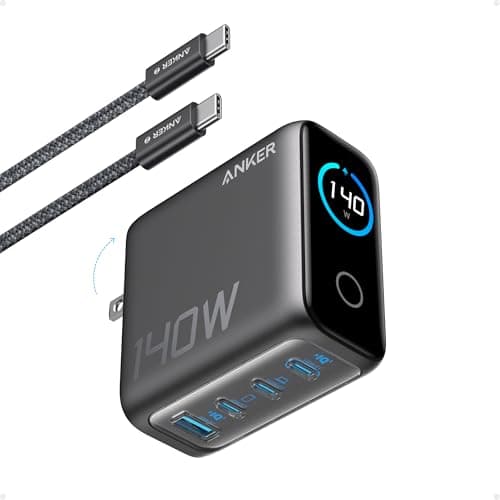
Anker 140W 4-Port GaN Charger
- 140W total output; up to 140W on a single USB-C port
- 4 ports: 3× USB-C + 1× USB-A
- GaN technology — compact for 140W output
- USB-C Power Delivery 3.1 compliant
- ActiveShield 2.0 temperature monitoring
Pros
- +Comfortably covers every XPS model — 65W, 100W, and 130W needs from one charger
- +Compact for 140W — smaller and lighter than the Dell OEM brick
- +Three USB-C ports charge XPS + phone + tablet simultaneously
- +Excellent thermal management for extended work sessions
Cons
- −Single-port hits the full 140W only when other ports are idle
- −More wattage (and a bit more cost) than an XPS 13 owner strictly needs
Best for: Dell XPS owners who want one charger that covers any model — XPS 13, 15, or 17 — at full speed.
Who should skip: Dedicated XPS 13 users who never charge anything else. They can save money with a compact 65W single-purpose charger, since the XPS 13 only draws 65W.
The Anker 140W 4-Port GaN charger is the best single charger for the entire Dell XPS line. It delivers up to 140W on its top USB-C port — more than enough for the XPS 15's 100W spec and the XPS 17's 130W peak draw — in a package noticeably smaller than the OEM Dell brick. GaN keeps heat low during extended sessions, and the three USB-C ports mean you can charge your phone and tablet in parallel without a second charger.
See Current Price on Amazon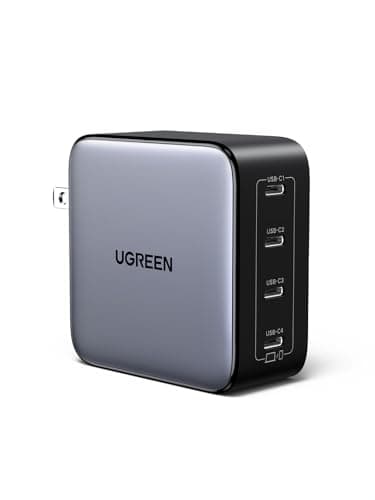
UGREEN Nexode 100W 4-Port GaN Charger
- 100W max output; USB-C Power Delivery 3.0
- 4 ports: 3× USB-C + 1× USB-A
- GaN chip with multi-port smart power allocation
- Compact folding prongs for travel
- Wide compatibility including Dell XPS, MacBook, ThinkPad
Pros
- +Best price-per-watt for a quality 100W GaN charger
- +4 ports handle XPS + phone + tablet + USB-A accessory at once
- +Compact for a four-port 100W block
- +Reliable UGREEN build quality at a lower price than Anker
Cons
- −Per-port wattage drops when all 4 ports are actively charging
- −Slightly less premium build feel than higher-priced Anker chargers
Best for: Budget-conscious Dell XPS 15 owners who need multi-port charging without paying a premium.
Who should skip: Users who primarily need maximum single-port wattage. If all 4 ports are in use, per-port output decreases — the Anker 140W 4-Port GaN charger delivers more headroom when you need full-speed charging under load.
UGREEN's Nexode 100W offers exceptional value for Dell XPS users. At around $45, it undercuts the Anker by $10 while delivering the same 100W output and adding an extra USB-C port. The smart power allocation ensures your XPS gets priority, with remaining wattage distributed to other connected devices. For remote workers with multiple devices, the 4-port design is a genuine quality-of-life upgrade.
See Current Price on AmazonNew USB-C guides, by email
One email when we publish a new guide or meaningfully update an old one. Nothing else.
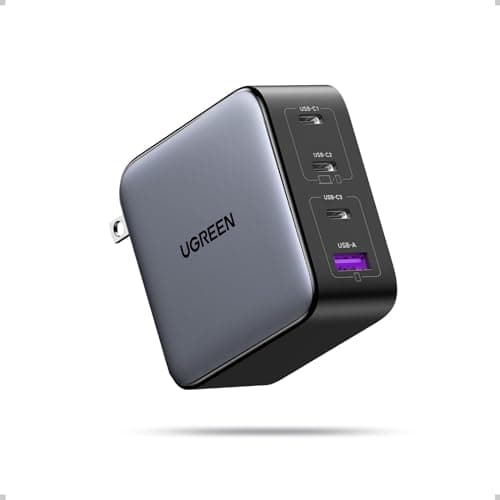
UGREEN Nexode 100W 4-Port GaN
- 100W total; up to 100W on a single USB-C port
- 4 ports: 3× USB-C + 1× USB-A
- GaN technology in a compact, travel-friendly body
- Thermal Guard temperature monitoring across all ports
- Wide compatibility with Dell XPS 13, 15, MacBook, and ThinkPad
Pros
- +Lowest price here for a genuine 100W GaN charger — hits Dell's XPS 15 spec
- +Four ports charge XPS + phone + tablet + a USB-A accessory at once
- +Compact and light enough to live permanently in a laptop bag
- +Smart per-port power allocation keeps the XPS prioritized
Cons
- −Per-port wattage drops when all four ports are charging at once
- −100W single-port — below the Dell XPS 17's peak 130W requirement
Best for: Budget-minded XPS 13 and XPS 15 owners who want full-speed 100W charging plus extra ports at the lowest price.
Who should skip: Dell XPS 17 owners. The 100W single-port output falls short of the XPS 17's 130W peak draw — step up to the Anker 140W 4-Port GaN for that model.
UGREEN's Nexode 100W 4-port is the value champion of this roundup. At around $33 it undercuts every other 100W option while still delivering the full 100W the XPS 15 needs and adding a fourth port. Smart power allocation keeps your XPS charging at priority, and the compact GaN body makes it easy to carry. For XPS 13 and XPS 15 owners who want maximum ports for minimum money, it's hard to beat.
See Current Price on AmazonAnker 140W 4-Port GaN Charger
- 140W total; up to 140W on a single USB-C port
- 4 ports: 3× USB-C + 1× USB-A for multi-device charging
- GaN technology — compact for 140W output
- USB-C PD 3.1 compliant — covers XPS 17's peak draw
- ActiveShield 2.0 temperature monitoring for safe sustained charging
Pros
- +140W single-port fully covers Dell XPS 17's 130W peak power draw
- +Headroom for heavy creative workloads — video editing, 3D rendering
- +Multi-device: charge XPS + phone + tablet + USB-A accessory at once
- +Future-proof for next-generation Dell XPS models
Cons
- −More wattage than XPS 13 and XPS 15 owners strictly need
- −Costs more than a basic 65W or 100W single-purpose charger
Best for: Dell XPS 17 users running sustained heavy workloads who need guaranteed full-speed charging under load.
Who should skip: Dell XPS 13 and XPS 15 owners on a tight budget. Both models charge fully at 100W or less — the UGREEN Nexode 100W covers them for less money if you don't need the extra headroom.
The Dell XPS 17 is the most power-hungry model in the XPS line, drawing up to 130W under sustained CPU and GPU load. A 100W charger can leave you in a battery-neutral or slow-drain state during intense sessions. The Anker 140W 4-Port GaN charger's 140W single-port output provides a 10W headroom above the XPS 17's peak draw, ensuring the battery charges even during demanding video editing or 3D rendering workflows — not just during lighter tasks. (This is the same charger as our Best Overall pick, here recommended specifically for the XPS 17's higher draw.)
See Current Price on Amazon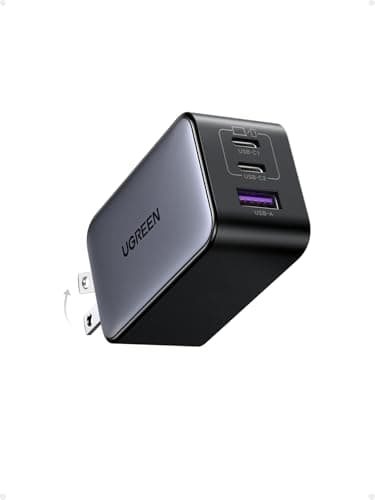
UGREEN Nexode 65W
- 65W max on a single USB-C port
- 3 ports: 2× USB-C + 1× USB-A
- GaN chip in an ultra-compact travel-friendly body
- Supports USB-C PD 3.0 — matches XPS 13's native spec
- Foldable prongs, weighs only 115g
Pros
- +Best value for XPS 13 users — 65W is exactly what Dell specifies
- +Smallest and lightest charger in this roundup — ideal for travel
- +Under $36 — the most affordable quality GaN option here
- +Dual USB-C ports for XPS 13 + phone from one wall outlet
Cons
- −Insufficient for XPS 15 or XPS 17 — slow charging or power deficit
- −65W drops with multiple ports in use
Best for: Dell XPS 13 owners who want the most compact and affordable GaN charger that meets Dell's 65W USB-C spec.
Who should skip: Anyone with an XPS 15 or XPS 17. These models require 100W and 130W respectively — a 65W charger will cause net battery drain under normal use on those systems.
Dell specifies 65W USB-C PD for the XPS 13, and this UGREEN Nexode delivers exactly that in one of the smallest packages available. At under $36, it's the right tool for the right laptop — there's no reason to carry a heavier, more expensive 100W charger for a machine that maxes out at 65W. The compact form factor makes it particularly appealing for XPS 13 users who travel frequently.
See Current Price on AmazonQuick Reference: All Picks at a Glance
| Pick | Product | Wattage | Price | XPS Model |
|---|---|---|---|---|
| BEST OVERALL | Anker 140W 4-Port GaN Charger | 140W | $79.99 | XPS 15 |
| BEST VALUE | UGREEN Nexode 100W 4-Port GaN Charger | 100W | $49.99 | XPS 15 |
| BUDGET 100W PICK | UGREEN Nexode 100W 4-Port GaN | 100W | $42.99 | XPS 15 |
| BEST FOR XPS 17 | Anker 140W 4-Port GaN Charger | 140W | $79.99 | XPS 17 |
| BEST FOR XPS 13 | UGREEN Nexode 65W | 65W | $27.99 | XPS 13 |
How to Choose a USB-C Charger for Dell XPS
Picking the wrong charger for your Dell XPS is a common and costly mistake. Here are the four factors that matter most for XPS owners specifically.
- Match wattage to your XPS model. Dell XPS 13 = 65W, XPS 15 = 100W, XPS 17 = 130W. Using a lower-wattage charger won't damage the laptop, but it will cause slow or negative charging under load. Using a higher-wattage charger is perfectly safe — the laptop only draws what it needs.
- Use the Thunderbolt 4 port for charging. All recent XPS models have Thunderbolt 4 ports, which support USB-C PD at higher wattage. Plugging into a standard USB-C port (if your model has one) may limit charging speed. Check your Dell documentation to confirm which port supports full USB-C PD.
- GaN is the right technology for XPS users. Traditional chargers at 100W+ are bulky and heavy. GaN chargers deliver the same wattage in a significantly smaller, lighter package — which matters for XPS users, who typically choose XPS for its portability. A 100W GaN charger can be nearly as small as a phone charger.
- Don't confuse Thunderbolt 4 charging with Thunderbolt 4 data/display. Any USB-C PD charger will charge your XPS via its Thunderbolt 4 port at full speed. But to use the Thunderbolt 4 port for external monitors or fast data transfer, you need a Thunderbolt 4-certified hub or dock, not just a charger.
Dell XPS USB-C Charger FAQ
Related Guides
Best 100W USB-C Chargers
Full guide to 100W GaN chargers — the most common wattage tier for Dell XPS 15 users.
Best GaN Chargers for Travel
Dell XPS owners who travel frequently — the most compact multi-device GaN chargers for carry-on bags.
How USB-C Power Delivery Works
Understand PD negotiation, wattage limits, and why some chargers charge your XPS faster than others.
Best 100W USB-C Cables
The cable matters as much as the charger — especially for XPS 17 users who need E-Marker cables at 130W+.
Summary
The best USB-C chargers for Dell XPS in 2026 are: the Anker 140W 4-Port GaN charger (~$79.99, best overall — covers every XPS model); the UGREEN Nexode 100W (~$45.99, best value for XPS 15); the UGREEN Nexode 100W 4-Port GaN (~$33.23, lowest-priced 100W pick for XPS 13 and 15); the Anker 140W 4-Port GaN charger (~$79.99, the right choice for XPS 17 under heavy load); and the UGREEN Nexode 65W (~$35.99, the perfect compact pick for XPS 13). Match the wattage to your model — 65W for XPS 13, 100W for XPS 15, and 130W+ for XPS 17 — and choose GaN for the most compact form factor.