
Best USB-C Accessories for Lenovo ThinkPad (2026)

Lenovo ThinkPads have supported USB-C Power Delivery charging since 2019 — meaning you can replace that bulky square brick with a compact GaN charger, add a slim USB-C hub for your desk, and carry one cable for everything. Any 65W+ USB-C PD charger works with ThinkPad — but the right hub and cable make the difference between a clean, productive workstation and a frustrating port juggle. This guide covers the five best USB-C accessories for ThinkPad X1 Carbon, T14, T16, and X13, chosen specifically for corporate and IT professional workflows.
All picks are assessed on ThinkPad compatibility, rated charging speed, and reported reliability in daily professional use. We cover the 65W sweet spot for ThinkPad charging, USB-C hub options with sufficient PD passthrough, and why an E-Marker cable matters at higher wattages.
Quick Answer
Yes — any 65W+ USB-C PD charger works with ThinkPad. All ThinkPad models from 2019 onward support USB-C charging via the USB-C PD standard. The X1 Carbon, T14, T16, and X13 all charge at 65W via USB-C — and a higher-wattage charger (100W, 120W) is safe because ThinkPad only draws what it needs. Third-party chargers do not void your warranty. For desk use, add a USB-C hub with at least 85W PD passthrough so your ThinkPad keeps charging while the hub is connected.
ThinkPad USB-C Compatibility Guide
ThinkPad models vary slightly in their USB-C charging specifications. Use this reference to confirm the minimum and recommended USB-C PD wattage for your model before purchasing.
| ThinkPad Model | Min USB-C Wattage | Recommended | Notes |
|---|---|---|---|
| X1 Carbon (Gen 10+) | 45W | 65W | 65W = full speed; 45W = slow charging under load |
| T14 / T14s (Gen 3+) | 45W | 65W | AMD models also charge via USB-C PD |
| T16 (Gen 1+) | 65W | 100W | Larger display increases power draw; 100W recommended |
| X13 (Gen 3+) | 45W | 65W | Compact model; 65W charges efficiently |
| L14 / L15 (Gen 3+) | 45W | 65W | Business-class; same USB-C PD standard |
| ThinkPad X1 Extreme | 65W | 135W+ | High-TDP model; use original charger for gaming load |
Note: When connecting a USB-C hub, add ~15W to the recommended wattage to account for hub overhead. A 65W charger powering a hub may deliver only ~50W to the ThinkPad — use an 85W+ charger for hub setups.
The 5 Best USB-C Accessories for ThinkPad
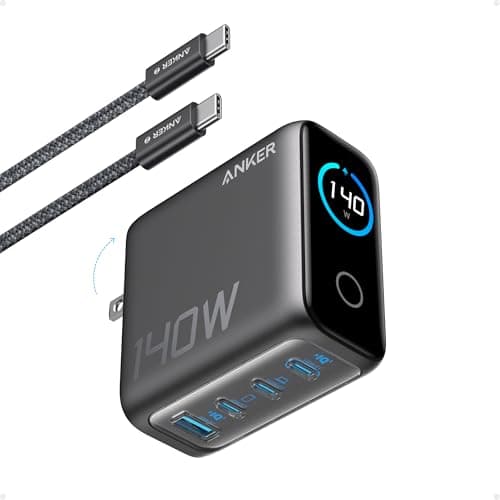
Anker 140W 4-Port GaN Charger
- 140W total output; up to 140W on a single USB-C port
- 4 ports: 3× USB-C + 1× USB-A for multi-device charging
- GaN technology — compact form factor for 140W output
- USB-C Power Delivery 3.1 compliant — negotiates correct voltage with ThinkPad
- ActiveShield 2.0 temperature monitoring adjusts power per connected device
Pros
- +Huge headroom — ThinkPad charges at 65W, leaving plenty of power for phone and tablet
- +GaN chip runs cooler and more efficiently than legacy ThinkPad barrel chargers
- +Three USB-C ports mean one charger handles laptop, phone, tablet, and a USB-A accessory
- +Compact for 140W — easy to drop in a bag alongside your ThinkPad
Cons
- −More wattage than strictly needed for ThinkPad-only charging
- −Premium price compared to a basic 65W single-port charger
Best for: ThinkPad users who want one charger for everything — laptop, phone, and tablet — in a single compact unit.
Who should skip: Users who only ever charge their ThinkPad at their desk and already have other devices on separate chargers. A simple 65W single-port GaN charger will suffice at a lower price.
The Anker 140W 4-Port GaN charger is the smartest upgrade for ThinkPad users replacing that heavy square Lenovo brick. Its top USB-C port delivers up to 140W — far above the 65W ThinkPad charging threshold — and the GaN chip keeps it surprisingly compact for what it outputs. Three USB-C ports plus a USB-A port mean you can charge your ThinkPad, phone, and tablet from a single wall outlet, which most business travelers quickly realize is essential.
See Current Price on Amazon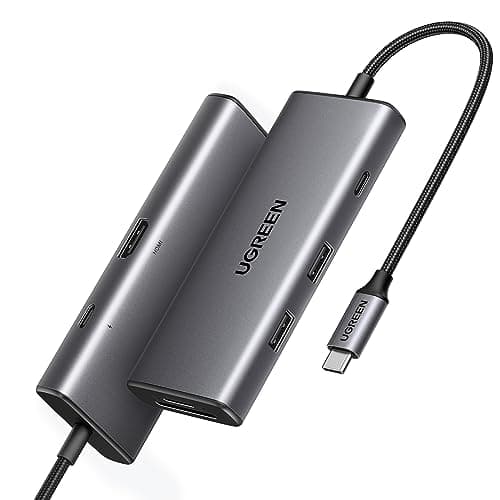
UGREEN Revodok 107 USB-C Hub 7-in-1
- 7-in-1: HDMI 4K@30Hz, 3× USB-A 3.0, USB-C PD 100W passthrough, SD + microSD
- 100W PD passthrough — charges ThinkPad at full 65W while hub is in use
- Bus-powered — no separate power cable needed
- Aluminum chassis for passive heat dissipation during long work sessions
- Compatible with ThinkPad X1 Carbon, T14, T16, X13, and all Thunderbolt 4 models
Pros
- +100W passthrough sustains ThinkPad charging even with multiple devices connected
- +3 USB-A ports — connects keyboard, mouse, and USB drive simultaneously
- +SD + microSD slots eliminate the need for a separate card reader
- +Compact bus-powered design — no extra power brick for the hub itself
Cons
- −HDMI limited to 4K@30Hz — not ideal for high-refresh gaming
- −No Ethernet port in this model (see Revodok Pro for Ethernet)
Best for: ThinkPad users who need a clean home office expansion setup with monitor output, USB-A ports, and card reader.
Who should skip: ThinkPad users who need Gigabit Ethernet for video calls or VPN access. Step up to the UGREEN Revodok Pro or a full USB-C dock with Ethernet built in.
The UGREEN Revodok 107 solves the most common ThinkPad pain point: the laptop only has two Thunderbolt 4 ports and one USB-A, yet corporate workflows demand keyboard, mouse, external drive, monitor, and card reader all at once. This hub adds seven connections from a single USB-C cable, and its 100W passthrough means your ThinkPad keeps charging at full speed throughout the workday — no power compromise.
See Current Price on Amazon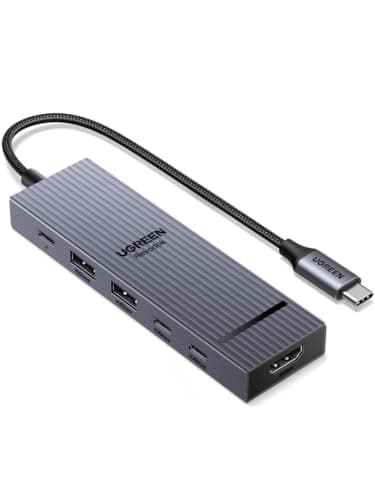
UGREEN Revodok Pro USB-C Hub 6-in-1
- 6-in-1: HDMI 4K@60Hz, 2× USB-A, 1× USB-C data (10Gbps), USB-C PD 100W passthrough, SD + microSD
- 100W PD passthrough — well above the 65W ThinkPad charging threshold
- USB 3.2 Gen 2 at 10Gbps on the data ports for fast external storage
- Compact bus-powered design — fits in any laptop bag compartment
- Compatible with ThinkPad, MacBook, and most USB-C laptops
Pros
- +Best price in this roundup for a ThinkPad hub setup — under $16
- +100W passthrough comfortably sustains full-speed ThinkPad charging
- +4K@60Hz HDMI drives an external monitor at full refresh, not just 30Hz
- +10Gbps data ports handle external SSD transfers — rare at this price
Cons
- −Only 2 USB-A ports (vs 3 on the UGREEN Revodok 107)
- −No Ethernet — not suitable for wired corporate network requirements
Best for: ThinkPad users on a budget who need 4K HDMI, USB-A, and fast 10Gbps data without paying for features they won't use.
Who should skip: IT professionals who need Gigabit Ethernet or users who regularly connect three or more USB-A devices simultaneously. The UGREEN Revodok 107 is the better fit.
For ThinkPad users who just need an external monitor connection and a couple of USB-A ports, the UGREEN Revodok Pro 6-in-1 delivers far more than its price suggests. The 100W passthrough keeps your ThinkPad charging at full speed, the 4K@60Hz HDMI drives a monitor smoothly, and the 10Gbps USB-C data port handles external SSDs — a combination most budget hubs can't match. It's the right choice when you don't need Ethernet or a third USB-A port.
See Current Price on Amazon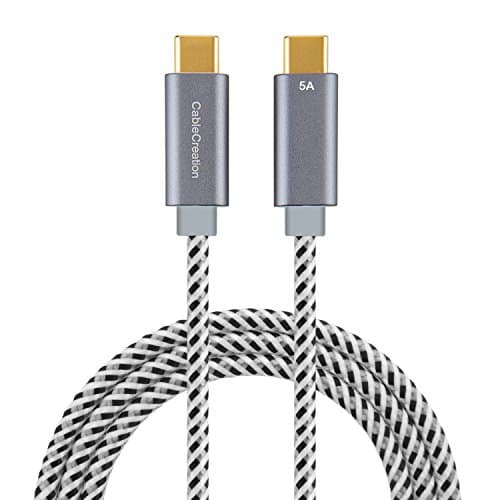
CableCreation USB-C to USB-C 100W 6ft
- 100W Power Delivery support with E-Marker chip for safe high-power charging
- 6ft (1.8m) — ideal desk length for ThinkPad placement flexibility
- Braided nylon jacket rated for 25,000+ bend cycles
- USB 2.0 data (480 Mbps) — sufficient for charging and basic data transfer
- USB-IF certified for safety at 100W output
Pros
- +E-Marker chip ensures full 100W negotiation — no throttling with ThinkPad or charger
- +6ft length gives flexibility for positioning ThinkPad away from the wall outlet
- +Braided nylon construction outlasts standard rubber cables significantly
- +Best value cable in this roundup — under $13
Cons
- −USB 2.0 data speeds only — not suitable for external SSD or high-speed data transfers
- −Not a Thunderbolt cable — cannot carry Thunderbolt 4 data or 40Gbps bandwidth
Best for: ThinkPad users who need a reliable, long-lasting 100W charging cable that won't fail or throttle power delivery.
Who should skip: Users who need to transfer large files to external SSDs or connect Thunderbolt 4 peripherals. For Thunderbolt use cases, invest in a certified Thunderbolt 4 cable ($30-50).
The cable is the most overlooked part of a ThinkPad USB-C setup — yet a poor-quality cable without an E-Marker chip will quietly throttle your charging speed. The CableCreation 100W cable solves this: the E-Marker chip guarantees full wattage negotiation with your charger and ThinkPad, the braided nylon jacket handles years of daily use, and the 6ft length gives you real desk flexibility without creating cable chaos.
See Current Price on Amazon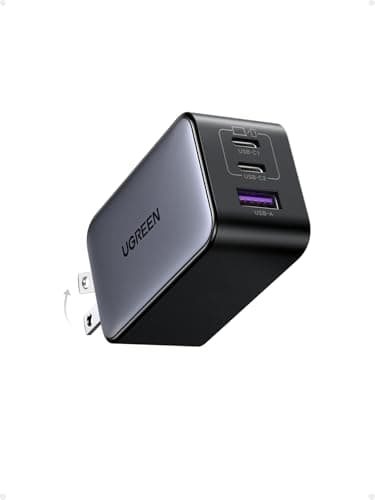
UGREEN Nexode 65W USB-C Charger
- 65W max on a single USB-C port — matches ThinkPad's exact charging sweet spot
- GaN technology in an ultra-compact, travel-friendly body
- Supports USB-C PD 3.0 for proper voltage negotiation with ThinkPad
- Foldable prongs for packing in a laptop bag or carry-on
- Single port design keeps form factor minimal
Pros
- +65W exactly matches Lenovo's specified ThinkPad USB-C charging wattage
- +Ultra-compact — barely larger than a phone charger despite 65W output
- +GaN chip runs cooler than traditional chargers at equivalent wattage
- +Best price in this roundup — ideal for a dedicated travel charger
Cons
- −Single port — cannot simultaneously charge phone without a second charger
- −65W is the minimum for ThinkPad; leaves no headroom if you add a USB-C hub
Best for: ThinkPad users who travel frequently and want the smallest possible charger that still delivers full-speed charging.
Who should skip: ThinkPad users who connect a USB-C hub at their desk. The 65W output is just enough for the laptop alone — connecting a hub's passthrough may cause slow charging under heavy load. Use the Anker 140W 4-Port GaN charger for desk setups.
Lenovo's original ThinkPad USB-C charger is a compact rectangle — but the UGREEN Nexode 65W beats it on size while matching the exact wattage. GaN technology lets UGREEN pack 65W into a charger barely larger than a standard USB-C phone adapter. For frequent travelers with a ThinkPad X1 Carbon or T14, this is the cleanest possible bag-friendly charging solution.
See Current Price on AmazonQuick Reference: All Picks at a Glance
| Category | Product | Price | Best For |
|---|---|---|---|
| BEST OVERALL CHARGER | Anker 140W 4-Port GaN Charger | $79.99 | ThinkPad users who want one charger for everything — laptop, phone, and tablet — in a single compact unit. |
| BEST USB-C HUB | UGREEN Revodok 107 USB-C Hub 7-in-1 | $57.20 | ThinkPad users who need a clean home office expansion setup with monitor output, USB-A ports, and card reader. |
| BEST BUDGET HUB | UGREEN Revodok Pro USB-C Hub 6-in-1 | $21.99 | ThinkPad users on a budget who need 4K HDMI, USB-A, and fast 10Gbps data without paying for features they won't use. |
| BEST USB-C CABLE | CableCreation USB-C to USB-C 100W 6ft | ~$12.99 | ThinkPad users who need a reliable, long-lasting 100W charging cable that won't fail or throttle power delivery. |
| BEST TRAVEL CHARGER | UGREEN Nexode 65W USB-C Charger | $27.99 | ThinkPad users who travel frequently and want the smallest possible charger that still delivers full-speed charging. |
ThinkPad USB-C Accessories FAQ
Related Guides
Best USB-C Hubs for Windows Laptops
Full hub roundup for Windows laptops — including Thunderbolt docks, 10-in-1 hubs, and travel-friendly options.
Best 100W USB-C Chargers
Full guide to 100W GaN chargers — ideal for ThinkPad T16 and users who want headroom for hub setups.
Can I Use Any USB-C Charger for My Laptop?
The full answer on USB-C PD compatibility — what wattages are safe and when to stick with the OEM charger.
Best 100W USB-C Cables
Why cable quality matters and which cables deliver full wattage without throttling — critical for ThinkPad setups.
Summary
The best USB-C accessories for Lenovo ThinkPad in 2026 are: the Anker 140W 4-Port GaN charger (~$79.99) as the best overall charger for multi-device setups; the UGREEN Revodok 107 7-in-1 hub (~$45.99) for complete home office port expansion with 100W passthrough; the UGREEN Revodok Pro 6-in-1 hub (~$15.99) as the best budget hub for monitor + USB-A needs; the CableCreation 100W 6ft cable (~$12.99) for reliable E-Marker certified charging; and the UGREEN Nexode 65W (~$35.99) as the ideal compact travel charger that matches ThinkPad's exact 65W sweet spot. All ThinkPad models from 2019 onward support USB-C PD charging — any 65W+ USB-C PD charger works and will not void your warranty.