
Best 140W USB-C Charger (2026)

Quick answer: The best 140W USB-C charger for most people is the UGREEN Nexode 140W (PD 3.1) because it delivers a real 140W and includes the 240W cable you actually need. The Anker 140W 4-Port with a smart display is best for multi-device desks, the Anker Prime 250W station is best when you need full power to two devices at once, and the Anker Prime 100W is the smart step-down if your laptop can't actually draw 140W. Critically, 140W is PD 3.1 EPR territory — it needs an EPR-marked 5A/240W cable, or it silently falls back to 100W.
Here's what most listings hide: 140W is not just "a bit more than 100W." It uses a higher voltage tier (28V) defined by USB-C PD 3.1 EPR, and both the charger and the cable have to support it. Get the cable wrong and your 140W charger quietly charges at 100W — the single most common reason a "140W" setup disappoints.
What 140W Charging Actually Requires
A 140W charge lives above the old 100W USB-C ceiling, in USB-C Power Delivery 3.1 EPR (Extended Power Range). Miss one piece and you drop back to 100W — even with a charger that says 140W on the box.
The three things that unlock a real 140W
- A PD 3.1 EPR charger: standard PD stops at 100W (20V). 140W needs the 28V EPR level, which only PD 3.1 chargers offer. See exactly how the EPR / 240W USB-C standard works.
- An EPR-marked 5A/240W cable: an ordinary 100W cable will not carry 140W. You need a 5A cable with an E-Marker chip rated 240W. Some chargers include one; otherwise pick up the right 5A cable here.
- A laptop that can draw 140W: the 16-inch MacBook Pro, workstations, and gaming laptops can. A 14-inch MacBook Pro, MacBook Air, or ultrabook caps near 100W and won't request more — check how much wattage your laptop needs.
In plain terms: the cable matters as much as the charger. A genuine 140W PD 3.1 brick paired with a 100W cable delivers 100W. Every charger below is a real EPR unit; the UGREEN pick even ships with the 240W cable so there's nothing left to get wrong.
Best 140W USB-C Chargers
Three genuine 140W PD 3.1 chargers plus one honest step-down for laptops that cap at 100W. They differ in port count, total power budget, and whether the EPR cable is included — which decides how well they hold 140W when a second device is plugged in. Building out a full MacBook Pro kit?
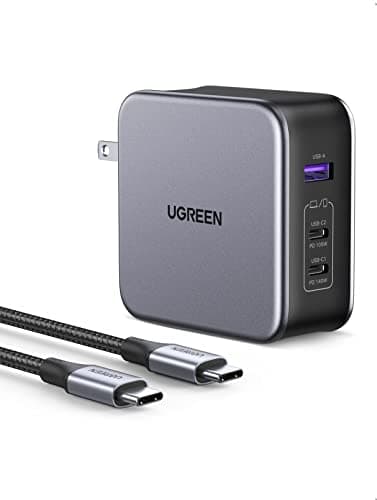
UGREEN Nexode 140W GaN 3-Port Charger (PD 3.1)
- 140W single-port max over USB-C PD 3.1 (EPR, 28V) with PPS
- 3 ports (2× USB-C, 1× USB-A) — GaN body stays foldable and compact
- Ships with a 240W-rated USB-C cable, so you're not hunting for an EPR cable separately
- Full 140W is single-port only; add a second device and the primary drops to ~100W and shares
- Charges the 16-inch MacBook Pro at full speed, plus iPhone, iPad, Galaxy, and Chromebook
Pros
- +Includes the EPR-marked 240W cable — the one part most 140W buyers forget and then blame the charger for
- +Genuine PD 3.1 EPR delivers a real 140W to a 16-inch MacBook Pro, not a capped 100W
- +GaN keeps a 140W 3-port charger small enough to travel with instead of the OEM brick
Cons
- −140W is available on the primary port alone — plug in a second device and it splits
- −Only one port carries the full EPR profile; the USB-A port is for phones and accessories, not laptops
Best for: 16-inch MacBook Pro and workstation-laptop owners who want one charger that hits full 140W and comes with the correct cable in the box.
Who should skip: If your laptop tops out at 100W (most 14-inch and ultrabook models), you'll never draw the extra 40W — a 100W charger charges those just as fast for less.
140W lives in USB-C PD 3.1 EPR territory (28V), and reaching it takes both a charger that negotiates EPR and a cable rated for 5A/240W. The UGREEN Nexode 140W solves both in one purchase: it delivers a true 140W on its primary port and includes a 240W cable, so nothing bottlenecks the handshake. The two extra ports cover a phone and earbuds when the laptop is topped off.
See Current Price on Amazon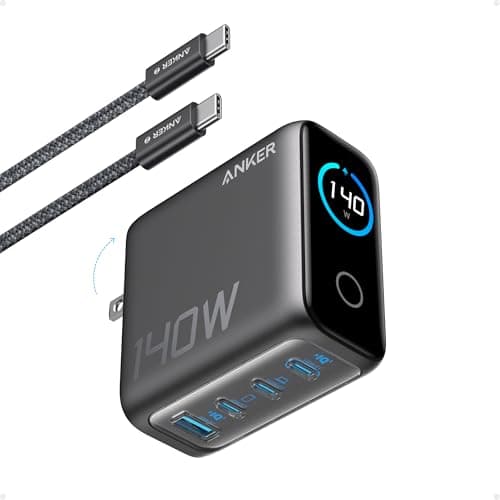
Anker 140W 4-Port GaN Charger (Smart Display)
- 140W max via USB-C PD 3.1 (EPR) on the primary port
- 4 ports (3× USB-C, 1× USB-A) with a smart display showing live per-port wattage
- Includes a 5ft charging cable rated for the full output
- Single-port hits 140W; with a second device the primary steps down to roughly 100W and shares the budget
- Touch controls let you cap or prioritize a port — useful on a shared desk
Pros
- +The live wattage display removes the guesswork — you can see when a second device has knocked the laptop down from 140W
- +Four ports handle a laptop, phone, tablet, and earbuds from a single outlet
- +Ships with a capable cable, and the EPR primary port reaches a true 140W on a 16-inch MacBook Pro
Cons
- −Like every 140W charger, the top 140W is single-port only — the display just makes the drop visible
- −Pricier than a single-port 140W brick because of the display and extra ports
Best for: People who run a laptop plus several devices off one charger and want to see exactly how the wattage is being split.
Who should skip: If you only ever charge the laptop, a single-port 140W charger is cheaper and delivers the same 140W. The display and extra ports are wasted on a one-device user.
The reason a 140W charger 'feels slow' is almost always that a second device pulled the laptop port down to ~100W — and normally you can't see it happen. Anker's smart display shows the live per-port wattage, so you know instantly whether your MacBook Pro is getting its full 140W or sharing. With four ports and a bundled cable, it's the cleanest multi-device 140W option.
See Current Price on AmazonNew USB-C guides, by email
One email when we publish a new guide or meaningfully update an old one. Nothing else.
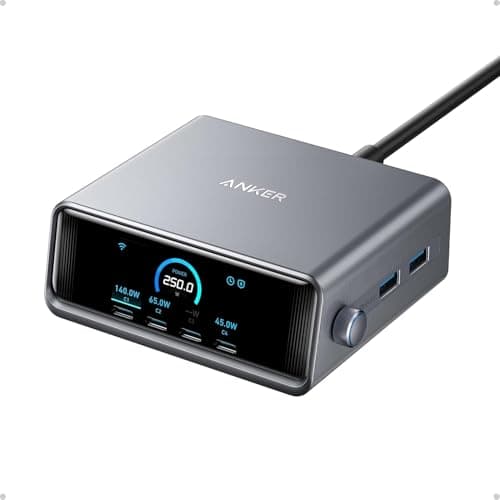
Anker Prime 250W 6-Port GaN Charging Station
- 250W total across 6 ports with a 2.26-inch LCD showing live per-port output
- Primary USB-C port reaches 140W over PD 3.1 EPR for a 16-inch MacBook Pro
- 250W total budget means it can run a 140W laptop AND a 100W second device at the same time without collapsing
- Sits on the desk rather than the wall — built for a permanent multi-device home-office setup
- Handles two laptops plus phones, tablets, and earbuds from one power brick
Pros
- +The 250W total headroom is what actually fixes the port-sharing problem — a 140W laptop and a 100W laptop can charge together
- +The best single answer for a home office or gaming desk that charges everything in one place
- +Per-port LCD readout shows exactly where the wattage is going
Cons
- −Overkill and over-budget if you only need to charge one laptop
- −Desk unit, not a foldable travel brick — it stays home
Best for: Home-office and gaming desks that charge two laptops plus phones and tablets and want a single station that never runs out of headroom.
Who should skip: Single-laptop users and travelers. If you charge one machine, a 140W brick is a third of the price and just as fast; this only earns its cost when many devices share it.
On a normal 140W charger, plugging in a second device drops the laptop port to ~100W because there isn't enough total power to go around. The Anker Prime 250W has enough total budget (250W) that it can push a full 140W to one laptop and 100W to a second device simultaneously — so the port-sharing tax that plagues smaller chargers mostly disappears. For a desk that powers a whole kit, it's the pick that never makes you choose.
See Current Price on Amazon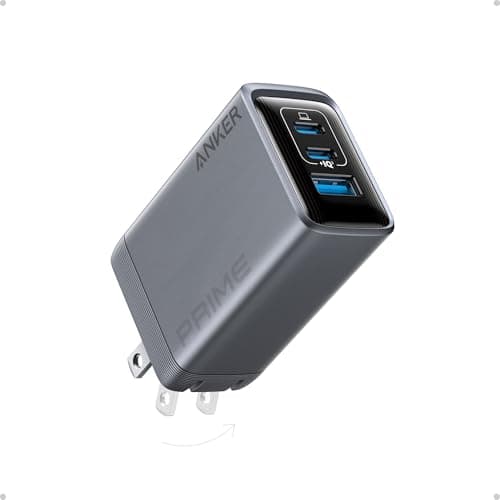
Anker Prime 100W 3-Port GaN Charger
- 100W total across 3 ports (2× USB-C, 1× USB-A) — standard PD, not EPR
- Charges 14-inch MacBook Pro, MacBook Air, and most ultrabooks at their full speed
- Foldable GaN body, genuinely pocketable for travel
- Works with any ordinary 5A/100W USB-C cable — no EPR cable required
- Single-port up to 100W; splits across ports when combined
Pros
- +Cheaper, smaller, and needs no special EPR cable — the right call if your laptop caps at 100W
- +Most 14-inch and ultrabook laptops can't draw more than 96–100W, so the extra 40W of a 140W charger would sit unused
- +Foldable GaN body travels far more easily than a 140W desk-class charger
Cons
- −Will NOT fast-charge a 16-inch MacBook Pro at its full 140W — it caps at 100W
- −No EPR headroom, so there's nothing to future-proof toward higher-draw laptops
Best for: Anyone whose laptop tops out at 100W — 14-inch MacBook Pro, MacBook Air, Dell XPS 13/14, and most ultrabooks — who doesn't need EPR at all.
Who should skip: 16-inch MacBook Pro, mobile-workstation, and gaming-laptop owners who genuinely draw 140W — you'll leave real charging speed on the table. Step up to a true 140W PD 3.1 pick above.
Not everyone shopping for 140W actually needs it. A 14-inch MacBook Pro, a MacBook Air, and most Windows ultrabooks peak at or below 100W, so a 140W charger's extra headroom goes unused while you pay for it and lug a bigger brick. If that's your laptop, the Anker Prime 100W is smaller, cheaper, and works with any everyday USB-C cable.
See Current Price on AmazonThe 140W Trap: What Happens When You Plug in a Second Device
This is the detail that decides whether you're happy with a 140W charger. On almost every model, the full 140W is a single-port maximum, not a per-port guarantee. The charger has one total power budget, and the moment you add a second device, the laptop port typically drops to around 90–100W while the rest goes to the new device.
That's not a defect — it's physics. A 140W charger only has 140W to give. The only way to keep a full 140W to your laptop and feed a second device is a charger with more total headroom, like the 250W station below.
| Charger | Total budget | Laptop alone | Laptop + 2nd device |
|---|---|---|---|
| UGREEN Nexode 140W | 140W | Full 140W | Laptop drops to ~100W, shares |
| Anker 140W 4-Port | 140W | Full 140W | Laptop drops to ~100W (display shows it) |
| Anker Prime 250W | 250W | Full 140W | 140W + ~100W together — no real drop |
| Anker Prime 100W | 100W | Up to 100W (no EPR) | Splits below 100W across ports |
The takeaway: if you charge one laptop, any real 140W brick is perfect. If you need full power to a laptop and a second device at once, only a higher-budget station like the Anker Prime 250W avoids the drop.
Do You Actually Need 140W — or Is 100W Enough?
The honest answer for a lot of buyers is: 100W is enough. Only laptops that can draw 140W benefit from a 140W charger — everything else just requests what it needs and ignores the extra headroom. Match the charger to your machine so you don't overpay or lug a bigger brick than you need.
| Your laptop | Typical peak | Needs EPR cable? | Buy |
|---|---|---|---|
| 16-inch MacBook Pro | 140W | Yes | 140W (UGREEN / Anker 140W) |
| Gaming / workstation laptop | 100–140W+ | Yes (for 140W) | 140W, or the barrel charger for peak load |
| 14-inch MacBook Pro | ~96–100W | No | 100W (Anker Prime 100W) |
| MacBook Air / ultrabook | 30–65W | No | 65–100W is plenty |
Rule of thumb: buy 140W only for a laptop rated near 140W. If yours caps at 100W, a 140W charger adds cost, size, and a mandatory EPR cable for zero extra speed. Our 65W vs 100W vs 140W breakdown maps every common laptop to its tier, and the 100W charger guide covers the step-down picks in depth.
Quick Reference: All Picks at a Glance
| Pick | Charger | Price | Best For |
|---|---|---|---|
| BEST OVERALL (INCLUDES CABLE) | UGREEN Nexode 140W GaN 3-Port Charger (PD 3.1) | $66.49 | 16-inch MacBook Pro and workstation-laptop owners who want one charger that hits full 140W and comes with the correct cable in the box. |
| BEST MULTI-PORT 140W | Anker 140W 4-Port GaN Charger (Smart Display) | $59.99 | People who run a laptop plus several devices off one charger and want to see exactly how the wattage is being split. |
| BEST FOR A FULL DESK | Anker Prime 250W 6-Port GaN Charging Station | $149.99 | Home-office and gaming desks that charge two laptops plus phones and tablets and want a single station that never runs out of headroom. |
| BEST STEP-DOWN (IF YOU DON'T NEED 140W) | Anker Prime 100W 3-Port GaN Charger | $45.59 | Anyone whose laptop tops out at 100W — 14-inch MacBook Pro, MacBook Air, Dell XPS 13/14, and most ultrabooks — who doesn't need EPR at all. |
140W USB-C Charging: FAQ
Related Guides
What Is EPR / 240W USB-C?
The PD 3.1 standard that makes 140W (and 240W) possible, explained in plain English.
Best 5A / 240W USB-C Cables
The EPR-marked cable your 140W charger needs — without it you're capped at 100W.
Best 100W USB-C Chargers
The step-down pick if your laptop caps at 100W and doesn't need EPR at all.
65W vs 100W vs 140W
Which wattage tier your specific laptop actually needs — side by side.
Best MacBook Pro Accessories
The full charging and hub kit for a 14-inch or 16-inch MacBook Pro.
How Much Wattage to Charge a Laptop?
Find your laptop's real charging draw before you buy 140W you can't use.
Summary
The best 140W USB-C charger for most people is the UGREEN Nexode 140W (PD 3.1) because it delivers a genuine 140W and includes the 240W cable you need; the Anker 140W 4-Port with a smart display is best for multi-device desks; the Anker Prime 250W 6-port station is best when you need full power to two devices at once; and the Anker Prime 100W is the honest step-down for laptops that cap at 100W. 140W is USB-C PD 3.1 EPR (Extended Power Range), which uses a 28V level above the old 100W ceiling — so it requires both a PD 3.1 charger and an EPR-marked 5A/240W cable. Pairing a 140W charger with an ordinary 100W cable silently caps charging at 100W, the most common 140W mistake. A 140W charger fast-charges the 16-inch MacBook Pro at its full speed and is the same 140W as Apple's own adapter. Note that on most 140W chargers the full 140W is single-port only: plug in a second device and the laptop port drops to about 90–100W, because the charger has one shared power budget. Only a higher-headroom station like the Anker Prime 250W can push a full 140W and 100W simultaneously. Finally, buy 140W only if your laptop can draw it — a 14-inch MacBook Pro, MacBook Air, or ultrabook peaks near 100W or below, so a 100W charger is smaller, cheaper, and just as fast for those.