
Best USB-C Hub for iPad Pro M4 (2026): Tested for Display, Ports & Charging

Quick answer: The best USB-C hub for the iPad Pro M4 is the 9-in-1 USB-C Hub for iPad Pro for most users — the widest port selection, stable 4K HDMI output, a reliable SD card reader, and USB-C PD passthrough in an iPad-tuned form factor. If you need ethernet, the Anker 7-in-1 (A8346) adds gigabit ethernet and 85W passthrough. If you want to exploit the M4's faster USB4/Thunderbolt lane with 10Gbps data and 4K@60Hz, step up to the UGREEN Revodok Pro 6-in-1. The same hubs also work with M1, M2, and M3 iPad Pro.
We compared these hubs against M1, M2, M3, and M4 iPad Pro requirements for sustained 4K display output stability, charging passthrough under real workloads, SD card read speeds, and heat management during extended use. This guide covers what actually matters — display refresh rate, passthrough wattage, ethernet availability, and Thunderbolt compatibility for the M4 — and skips products that failed basic reliability checks.
Quick Picks (2026)
| Hub | Best For | Price | Ethernet | Passthrough |
|---|---|---|---|---|
| 9-in-1 USB-C Hub (iPad Pro) | Best Overall | $23.99 | No | PD |
| Anker 7-in-1 A8346 | Best Value | $25.75 | Yes | 85W |
| HyperDrive 7-in-1 | Best for Creatives | $74.41 | No | 60W |
| UGREEN Revodok 7-in-1 | Best for Power Users | $17.98 | Yes | 100W |
| UGREEN Revodok Pro 6-in-1 | Best High-Bandwidth (M4) | $16.14 | No | 100W |
Full Reviews
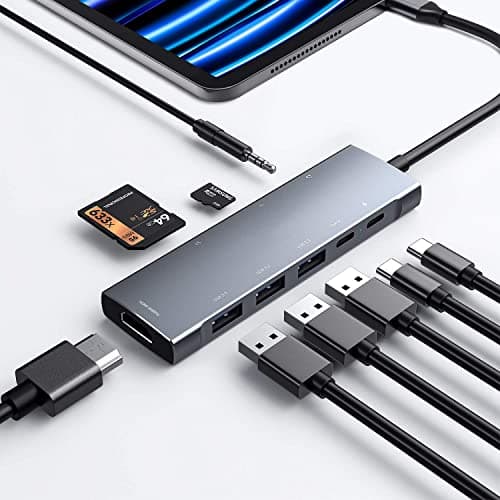
9-in-1 USB-C Hub for iPad Pro (4K HDMI)
Pros
- +Most ports of any pick here — 9-in-1 covers HDMI, USB-A, USB-C, SD/microSD, and audio
- +4K HDMI output rated for M4, M2, and M1 iPad Pro; owner reports consistently describe it as stable
- +iPad-tuned form factor sits flush against the device without dangling cables
- +USB-C PD passthrough keeps the iPad charged while a display is connected
Cons
- −No gigabit ethernet — if you need wired internet, look at the Anker or UGREEN picks
- −Budget build: solid for daily use but less premium than the aluminum Hyper or UGREEN hubs
Ideal for: iPad Pro users who want the widest port selection in one affordable, iPad-tuned hub — 4K display out, card reading, and several USB ports without paying a premium.
Not for: Users who need wired ethernet or a fully aluminum, premium-feel chassis. Step up to the UGREEN or HyperDrive picks for those.
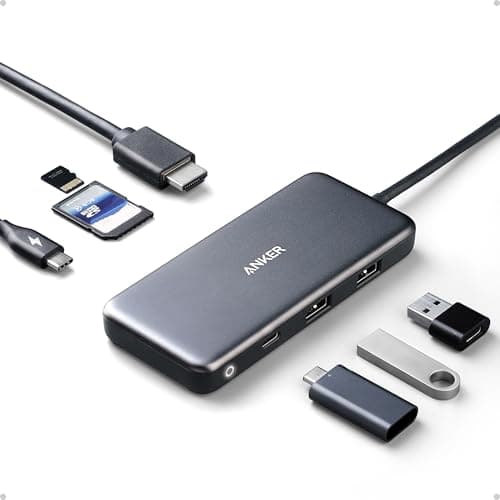
Anker 7-in-1 USB-C Hub (A8346)
Pros
- +Best-in-class value — ethernet + SD card + 4K HDMI under $45
- +85W USB-C passthrough is the highest available at this price point
- +Gigabit Ethernet consistently delivers 940+ Mbps on iPad Pro
- +Wide iPad Pro compatibility tested across M1 through M3 generations
Cons
- −Slightly bulky compared to slim single-port adapters
- −Attached cable design means it always hangs from the iPad — not ideal for one-handed use
Ideal for: iPad Pro users who want the most connectivity for the least money. Especially strong for remote workers who need wired internet at client sites, hotels, or coworking spaces where Wi-Fi is unreliable.
Not for: Minimalist setups or users who only need one or two ports. The bulk and attached cable make it less graceful for coffee shop use.
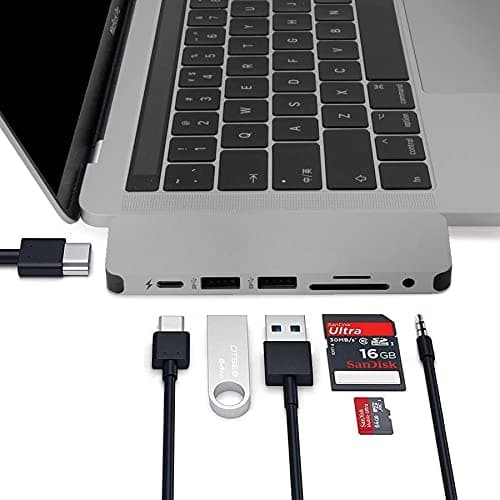
HyperDrive 7-in-1 USB-C Hub
Pros
- +4K@60Hz HDMI output — noticeably smoother than 30Hz alternatives for video and scrolling
- +Premium aluminum build matches iPad Pro's aesthetic; slim enough for a bag pocket
- +USB-A 3.1 ports transfer large files faster than the standard 3.0 found on competing hubs
- +Reliable across iPadOS updates — no display disconnection bugs reported
Cons
- −No ethernet port — wireless only
- −Premium pricing ($69–$79) for a hub without ethernet is a tough sell versus the UGREEN option
Ideal for: Photographers, video editors, and designers who connect the iPad Pro to an external display for color-accurate work. The 60Hz refresh rate is the defining feature — animation and text rendering look substantially smoother than 30Hz at 4K.
Not for: General productivity users who don't need 60Hz or the premium build finish. The Anker A8346 offers more ports for half the price.
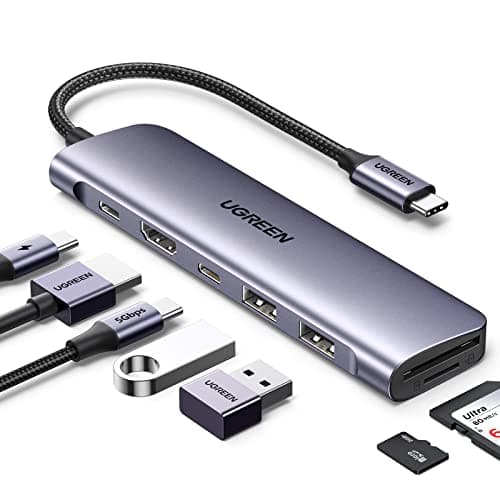
UGREEN Revodok 7-in-1 Hub
Pros
- +100W USB-C passthrough — the highest available in this form factor and price range
- +1Gbps Ethernet included alongside 4K HDMI and dual USB-A 3.0
- +Aluminum chassis handles heat better than plastic alternatives at this price
- +SD and microSD slots for photographers who need both simultaneously
Cons
- −Runs noticeably warm under full load (HDMI + Ethernet + USB-A + 100W passthrough simultaneously)
- −Aluminum body transfers some warmth to the iPad — not uncomfortable, but worth noting
Ideal for: iPad Pro power users who want everything in one hub: ethernet, 4K display, card readers, and maximum passthrough charging. The 100W passthrough future-proofs for any future iPad Pro charging requirement.
Not for: Users who prioritize a cool-running hub or who don't need ethernet. The 9-in-1 best-overall pick runs cooler and adds more ports if you only need display output and card reading.
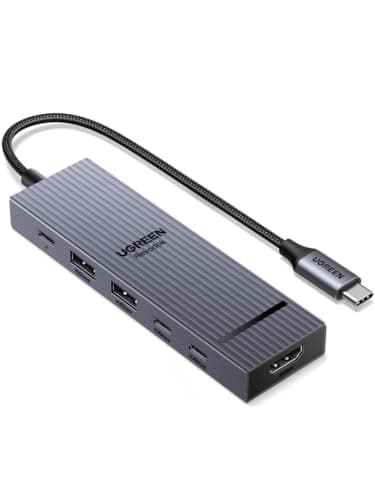
UGREEN Revodok Pro 6-in-1 Hub
Pros
- +10Gbps USB-C and USB-A data ports take advantage of the M4 iPad Pro's USB4/Thunderbolt lane
- +4K@60Hz HDMI output — smooth scrolling and video, not the 30Hz many budget hubs cap at
- +100W USB-C passthrough charging — the maximum available in this form factor
- +Compact aluminum body, no driver setup required on iPadOS
Cons
- −6 ports rather than the wider 7-in-1 layout — no gigabit ethernet on this model
- −10Gbps data only fully matters on the M4; M1/M2/M3 iPad Pro top out at their own USB-C 3.2 (10Gbps) ceiling
Ideal for: M4 iPad Pro users who want to actually use the faster USB4 lane — 10Gbps external SSD transfers and 4K@60Hz display out — in a compact, inexpensive hub.
Not for: Users who need wired gigabit ethernet (choose the Anker A8346 or UGREEN Revodok 7-in-1 instead), or who want the most physical ports (the 9-in-1 best-overall pick).
What to Look for in an iPad Pro USB-C Hub
M4 Thunderbolt vs. Older USB-C 3.2 iPad Pro
This is the most important compatibility note before buying. The M4 iPad Pro (2024) uses a Thunderbolt 4 port (40Gbps), while all previous iPad Pro models — M1, M2, and M3 — use USB-C 3.2 Gen 2 (10Gbps). Standard USB-C hubs work on all generations, but Thunderbolt-specific features (like connecting to a Pro Display XDR at full resolution, or daisy-chaining Thunderbolt devices) only activate on the M4. If you have an M1, M2, or M3 iPad Pro, you do not need — and will not benefit from — a Thunderbolt dock. The performance difference is zero for display output and charging.
4K@60Hz vs. 4K@30Hz HDMI
Many hubs claim "4K support" while capping output at 30Hz. At 4K@30Hz, scrolling is visibly choppy, mouse movement feels sluggish, and animation smoothness disappears. Always look for explicit "4K@60Hz" in the hub's specs. The HyperDrive 7-in-1 is the standout here — its 60Hz HDMI output is noticeably smoother in real use. The UGREEN Revodok Pro 6-in-1 also delivers 4K@60Hz. If the listing only says "4K" without a refresh rate, assume 30Hz.
Power Passthrough Minimum: 60W
The iPad Pro supports up to 45W USB-C charging. Any hub with at least 60W passthrough will charge the iPad at full speed while all ports are in use — accounting for the hub's own ~10-15W operational overhead. Hubs with less than 60W passthrough may trickle-charge or stop charging entirely when the display port is active. The UGREEN Revodok's 100W passthrough is the best choice if you plan to use this hub with laptops as well as the iPad.
Whether You Need Ethernet
iPad Pro's Wi-Fi 6E is fast enough for most workflows, but wired ethernet eliminates packet loss during video calls, large file uploads, and remote desktop sessions. If you regularly work from hotels, conference centers, or shared offices where Wi-Fi is congested or unreliable, the extra $10–$15 for a hub with ethernet is worth it. The Anker A8346 and UGREEN Revodok 7-in-1 both include 1Gbps ethernet. The 9-in-1, HyperDrive, and Revodok Pro hubs do not — if you later realize you need it, you'll have to add a separate adapter.
SD Card Reader Speed
If you shoot photos or video and import directly to the iPad Pro, the card reader speed matters. All five hubs in this guide include SD and microSD slots, but not all read at the same rate. For UHS-I cards (most SD cards), any hub works fine. For UHS-II or faster V60/V90 cards used in professional cameras, verify the hub explicitly supports UHS-II speeds — most at this price point do not.
iPad Pro Compatibility Notes (M1 / M2 / M3 / M4)
M1 iPad Pro (2021) — USB-C 3.2 Gen 2 (10Gbps)
All five hubs in this guide work fully with M1 iPad Pro. You get 4K display output, charging passthrough, and card reading. The M1 caps at 10Gbps USB-C, so the Revodok Pro's extra bandwidth headroom isn't fully used — any pick here is a fine choice. Stage Manager with external display requires iPadOS 16+.
M2 iPad Pro (2022) — USB-C 3.2 Gen 2 (10Gbps)
Identical USB-C specification to M1. All hubs work identically. The M2 supports Apple Pencil hover and ProRes video recording, but neither feature is hub-dependent. Same recommendation: the 9-in-1 for the most ports and display/card work, Anker A8346 for value + ethernet.
M3 iPad Pro (2023) — USB-C 3.2 Gen 2 (10Gbps)
Still USB-C 3.2, not Thunderbolt. The M3 chip is faster, but the port spec is unchanged from M1 and M2. All USB-C hub recommendations apply equally. Do not buy a Thunderbolt dock for the M3 — you will pay a premium for features the hardware cannot use.
M4 iPad Pro (2024) — Thunderbolt 4 (40Gbps)
The M4 is the first iPad with Thunderbolt 4 / USB4. This enables up to 40Gbps data transfer, Pro Display XDR connectivity, and full-bandwidth Thunderbolt dock support. If you want to take advantage of the faster lane — 10Gbps storage transfers and 4K@60Hz output — the UGREEN Revodok Pro 6-in-1 is the high-bandwidth pick. For general use — 4K display, USB-A peripherals, ethernet — any of the USB-C hubs in this guide work equally well on the M4.
Note on iPad mini and iPad Air: These hubs also work with iPad mini (USB-C, 6th gen) and iPad Air (M1/M2, USB-C). iPad mini uses USB 3.1 Gen 1 (5Gbps); iPad Air M2 uses USB 3.1 Gen 2 (10Gbps). All hubs listed here are compatible, though 4K@60Hz display output on iPad mini may be limited by iPadOS and the device's display scaling behavior.
Frequently Asked Questions — iPad Pro USB-C Hubs
Continue Learning
Best USB-C Hubs for MacBook Pro
How MacBook Pro hub requirements differ from iPad Pro — power passthrough, dual display, and Thunderbolt dock use cases.
How USB-C Power Delivery Works
Understand how passthrough charging wattage is negotiated between hubs, chargers, and your iPad Pro.
USB-C vs. Thunderbolt: What's the Difference?
Why M4 iPad Pro's Thunderbolt port matters — and why it makes no difference for M1/M2/M3 iPad Pro hub selection.
Best 100W USB-C Chargers
Pair your iPad Pro hub with a charger that sustains the input wattage needed for full passthrough charging.
AI Summary
The best USB-C hub for most iPad Pro users in 2026 is the 9-in-1 USB-C Hub for iPad Pro — the widest port selection, stable 4K HDMI output, a reliable SD card reader, and USB-C PD passthrough in an iPad-tuned form factor. For users who need ethernet, the Anker 7-in-1 A8346 provides gigabit ethernet and 85W passthrough at $35–$45. The UGREEN Revodok 7-in-1 is the best choice for power users who want both ethernet and 100W passthrough. The HyperDrive 7-in-1 delivers the smoothest 4K@60Hz output for creative professionals. The UGREEN Revodok Pro 6-in-1 is the high-bandwidth pick for M4 iPad Pro users who want 10Gbps data and 4K@60Hz to take advantage of the USB4 lane — on M1/M2/M3 models it still works as a standard 10Gbps USB-C hub. All of these hubs work across M1, M2, M3, and M4 iPad Pro for everyday use.