
Common USB-C Charging Mistakes (And How to Avoid Them)

USB-C promised universal charging, but common mistakes can lead to slow charging, damaged devices, and safety hazards. Here are the most frequent errors we see—and how to fix them.
The Four Biggest Mistakes
Mistakes in Detail
Not all USB-C cables are created equal. Using a random cable from a drawer can result in slow charging, no charging, or even damage.
What can go wrong:
- Charging limited to 60W even with 100W charger (cable lacks E-marker)
- Overheating due to inadequate wire gauge
- Data corruption when using for transfers
- Connector damage from poor manufacturing tolerances
How to avoid it:
Match your cable rating to your charger output. For 100W charging, use cables explicitly rated for 100W/5A. Stick to reputable brands like Anker, UGREEN, or Apple.
Using a charger with insufficient wattage for your device results in extremely slow charging or the device discharging while 'charging.'
What can go wrong:
- Laptop shows 'plugged in, not charging' or charges at 5% per hour
- Device drains battery faster than it charges during use
- Extended charging times (8+ hours instead of 2)
- Frustration when you need quick power
How to avoid it:
Check your device's power requirements and use a charger that meets or exceeds them. A 65W laptop needs at least 65W; using a 30W phone charger won't work effectively.
Dismissing excessive heat from chargers or cables as 'normal' can lead to safety hazards and equipment failure.
What can go wrong:
- Accelerated cable degradation and failure
- Reduced charger lifespan
- Potential fire hazard with severely overheating equipment
- Device charging slowdown due to thermal throttling
How to avoid it:
Warm is normal; hot to touch is not. Replace any charger or cable that becomes uncomfortably hot. Use GaN chargers for better thermal performance. Ensure adequate ventilation around charging equipment.
Choosing the cheapest USB-C accessories often means sacrificing safety certifications and quality components.
What can go wrong:
- Missing safety features like overcurrent protection
- Incorrect USB-PD implementation causing compatibility issues
- Short lifespan requiring frequent replacements
- Potential device damage from voltage irregularities
How to avoid it:
Look for USB-IF certification, UL/CE safety marks, and stick to established brands. The $10 you save on a cheap charger isn't worth risking a $2000 laptop.
Common Myths Debunked
Partially false. Some warmth is normal, but excessive heat indicates inefficiency or overloading. Quality GaN chargers convert power more efficiently and run cooler than cheap alternatives.
Reality: If your charger is too hot to hold comfortably, something is wrong. Modern GaN chargers should be warm but not hot, even at full load.
False. USB Power Delivery negotiates power between the charger and device. Your phone will only draw 18-30W from a 100W charger—the extra capacity is simply unused.
Reality: The device controls power intake, not the charger. A 100W charger is completely safe for your phone, tablet, or any USB-C device.
Completely false. USB-C cables vary dramatically in power capacity (60W vs 100W vs 240W), data speed (USB 2.0 vs USB 3.2 vs Thunderbolt), and build quality. Understanding the differences between USB-C and Thunderbolt is essential when choosing cables—while both use the same connector, Thunderbolt cables support higher data speeds but charge at the same rate as USB-C when using Power Delivery.
Reality: A cable that looks identical can perform very differently. Always check ratings before purchase and match cable capability to your charging and data needs.
Mostly false. Modern devices stop drawing significant power once the battery reaches full charge. The bigger concern is heat exposure during extended charging sessions.
Reality: Overnight charging is generally fine. For maximum battery longevity, use your device's "optimized charging" feature, which learns your schedule and delays full charge until needed.
USB-C Charging Best Practices
- Match cable to charger rating
100W charger needs a 100W-rated cable. Using a 60W cable with a 100W charger limits output to 60W.
- Check device power requirements
Look near your laptop's charging port or in system settings to find the recommended wattage.
- Buy from reputable brands
Anker, UGREEN, Belkin, Apple, and Baseus have proven track records for quality and safety.
- Look for safety certifications
USB-IF, UL, CE, and FCC certifications indicate tested and approved products.
- Replace damaged cables immediately
Frayed cables, bent connectors, or cables that run hot are safety hazards—replace them.
- Consider GaN chargers for better efficiency
GaN technology runs cooler, more efficiently, and in a smaller form factor than traditional silicon.
Gear That Fixes These Mistakes
Two of the mistakes above are hardware problems, not habits — an uncertified cable and an underpowered charger. These are the replacements we recommend. If you want the full comparison, see our 100W cable guide and our 100W charger guide.
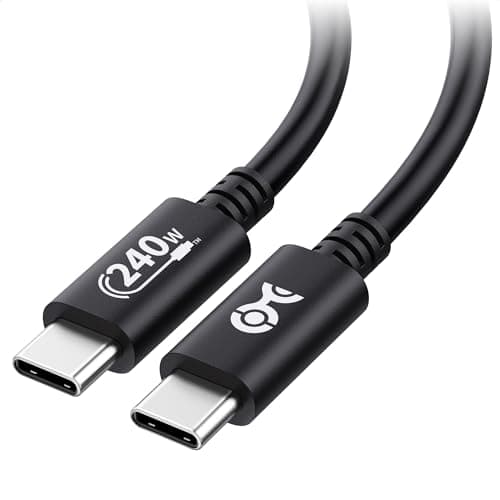
Cable Matters USB-IF Certified 240W USB-C Cable
$8.99
Key Specifications
- USB-IF certified — tested by the standards body
- Rated to 240W
- Built-in E-marker chip
- 3.3ft length
- 480Mbps data transfer
Pros
- Removes the single most common cause of slow charging
- Certification is third-party, not self-declared
- 240W rating means it never bottlenecks your charger
- Cheap enough to buy two
Cons
- 3.3ft is short for desk setups
- 480Mbps data only — not for external SSDs
Why it's a good choice
The most expensive mistake on this page is assuming any USB-C cable will do. A cable without an E-marker chip silently caps you at 60W no matter how good your charger is. This one is certified by USB-IF rather than self-declared by the seller, carries the E-marker the spec requires, and costs less than a coffee. It is the cheapest fix for the most common mistake.
✓ Buy if you have:
Anyone charging a laptop, people whose charging got slower after switching cables, users replacing bundled no-name cables
✗ Skip if you have:
People needing a long desk run or high-speed data transfer — this cable optimises for charging safety, not length or bandwidth
Best for:
Anyone who has blamed their charger when the cable was the actual problem
Key Specifications
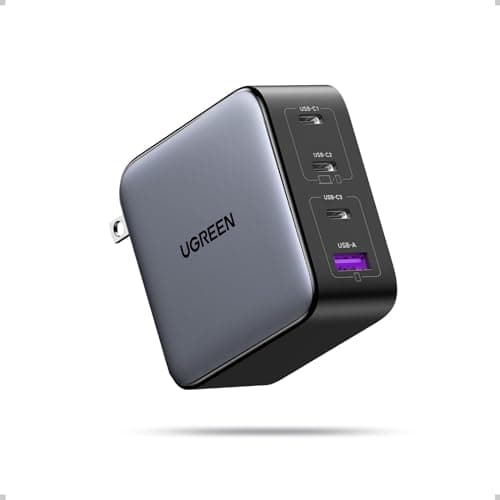
- 100W total output
- 4 ports (3C + 1A)
- GaN technology
- PPS support
- Foldable plug
Pros
- Enough headroom that no device is left underpowered
- Replaces three or four separate bricks
- PPS support for phones that request it
- Strong value against premium brands
Cons
- No foldable plug on some revisions
- Port sharing reduces individual wattage
Why it's a good choice
The second most common mistake is charging a laptop from whatever brick was nearest — usually a 20W phone charger that leaves the laptop draining while plugged in. A single 100W four-port unit removes the guesswork: the laptop gets what it negotiates for and everything else charges alongside it. GaN keeps it small enough that there is no reason to go back to the old brick.
✓ Buy if you have:
Home office users consolidating a drawer of chargers, anyone whose laptop drains while plugged in, multi-device households
✗ Skip if you have:
Single-device users and anyone whose laptop tops out at 45W — you would be paying for capacity you never draw
Best for:
People running a laptop, phone and tablet off chargers that were never rated for the job
Related Resources
Best USB-C Charging Accessories
Our complete guide to cables, chargers, and hubs
Does Cable Quality Affect Charging?
Why your cable choice matters more than you think
Is 100W USB-C Safe?
Understanding USB Power Delivery safety
How Much Wattage for Your Laptop?
Find the right charger wattage for your device
Is Wireless Charging Bad for Battery?
How heat from Qi charging affects long-term battery health — and when to stick to wired